
Someone in your community is searching for a church right now.
Imagine a family has just moved into your city. They do not know many people yet, but they are looking for a church where they can worship, build relationships, and help their children grow in their faith.
What will they probably do first?
They will pull out their phone and search for something like:
- Churches near me
- Christian church near me
- Family church in my city
- Church services this Sunday
Within seconds, Google may show them a list of churches with photos, reviews, service times, directions, phone numbers, and links to church websites.
Now here is the important question:
Will your church appear in those results?
If your church is missing from Google Search or Google Maps, you may be missing an opportunity to connect with people who are already looking for a church.
The good news is that you do not need a huge marketing budget, a large communications department, or advanced technical skills to improve your local visibility.
One of the most effective tools available to churches is completely free.
It is called a Google Business Profile.
In this guide, we are going to walk step by step through how to create, claim, verify, and begin optimizing a Google Business Profile for your church.
Let’s get started.
What Is a Google Business Profile for Churches?
A Google Business Profile is a free online listing that allows your church to appear in Google Search and Google Maps.
You may also hear people refer to it by its former name, Google My Business.
When someone searches directly for your church or uses a local search phrase such as “churches near me,” Google may display your church’s Business Profile.
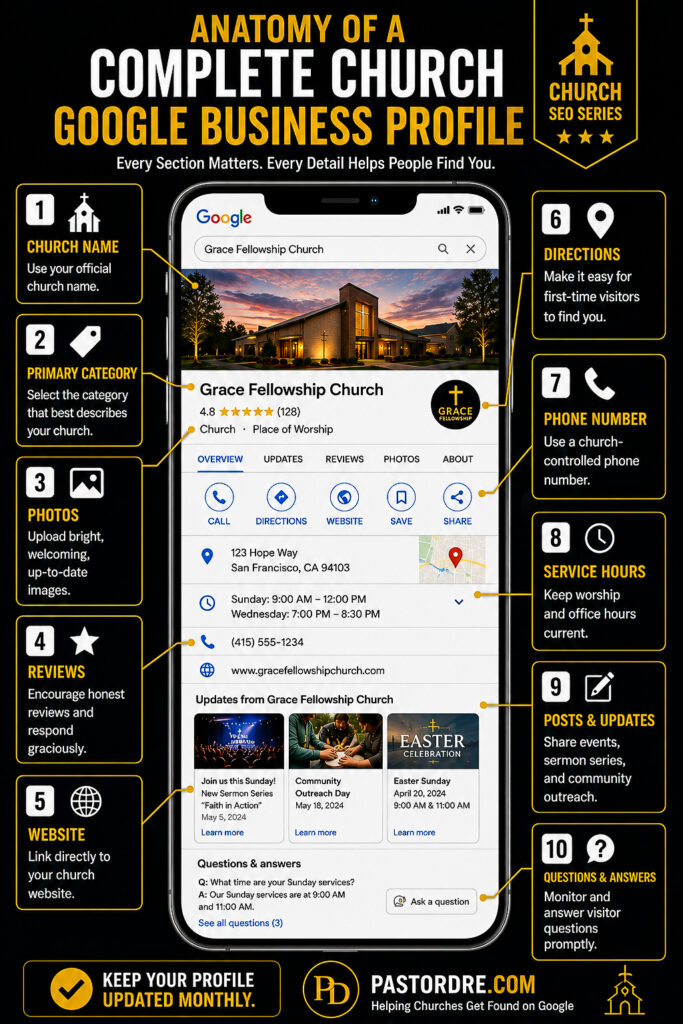
A completed profile can include important information such as:
- Your church name
- Church address
- Phone number
- Website
- Service times
- Office hours
- Photos
- Google reviews
- Directions
- Upcoming events and announcements
Think of it this way:
Your church website is your digital front door. Your Google Business Profile is the sign that helps people find that front door.
Your website gives people a deeper look at your ministry, beliefs, leadership, events, and vision.
Your Google Business Profile helps people discover your church in the first place.
When your church website and Google Business Profile work together, they create a stronger digital outreach system.
If your website is difficult to use on a phone, consider reading our guide on creating a mobile-friendly church website. Many people who discover your church through Google Maps will visit your website from a mobile device.
Why Is a Google Business Profile Important for Your Church?
Years ago, people might have driven around their neighborhood looking for church buildings or searched through a phone book.
Today, many people begin their search online.
Before a first-time guest attends your church, they may look at your Google Business Profile to find answers to questions like:
- What time does the service begin?
- Where is the church located?
- Is there parking available?
- Does the church offer children’s ministry?
- What denomination is the church?
- What does the worship environment look like?
- What are other people saying about the church?
When your profile is accurate and complete, it can begin building confidence before someone ever walks through your doors.
Your Google Business Profile may be one of the first impressions someone receives of your ministry.
That is why the information should be accurate, welcoming, and regularly updated.
Hold up a minute! A Google Business Profile is not simply a marketing tool. It can become part of your church’s outreach strategy. People searching online may be looking for community, prayer, hope, or a fresh start.
🎥 Prefer to watch first? This short lesson explains why Google Business Profile is one of the most important local SEO tools your church can use before we walk through the complete setup process below.
What Are the Benefits of a Google Business Profile for Churches?
A properly managed Google Business Profile can help your church in several practical ways.
1. Increased Local Visibility
Your church may appear in Google Maps and local search results when people search for churches in your area.
2. More Church Website Visitors
People can click from your Google listing directly to your church website to learn about your ministries, leadership, beliefs, and upcoming events.
3. More Phone Calls
Mobile users can call your church directly from the profile with one tap.
4. Easier Directions
Google Maps can provide visitors with turn-by-turn directions to your church.
5. Greater Trust
Current photos, accurate information, and thoughtful responses to reviews can help your church appear active, trustworthy, and welcoming.
6. Better Local Church SEO
Your Google Business Profile can support your church’s local search visibility by helping Google understand your location, ministry category, and connection to the surrounding community.
7. A Stronger First-Time Visitor Experience
Visiting a church for the first time can feel intimidating. Your profile can answer important questions and help remove some of that uncertainty.
Church growth is not only about getting more attention. It is about making it easier for people to take their next step.
For additional church outreach strategies, you can also explore these fresh ideas for church growth.
When Should Your Church Create a Google Business Profile?
The simple answer is:
As soon as possible.
Whether your church has served its community for fifty years or you are preparing to launch a new church plant, you should make sure your Google Business Profile is claimed and accurate.
Your church should create or update its profile if:
- You are planting a new church.
- Your church recently moved.
- Your phone number changed.
- Your worship service times changed.
- You launched a new campus.
- You redesigned your church website.
- Your profile contains outdated information.
- No one currently knows who manages the listing.
- Your church is not appearing correctly in Google Maps.
Even if someone created a listing for your church years ago, you should still review it.
Unclaimed or neglected profiles sometimes contain incorrect service times, outdated photos, old phone numbers, or links to the wrong website.
The sooner your information is complete and accurate, the sooner Google can confidently show it to people searching in your community.
Before You Set Up Your Church’s Google Business Profile
Before beginning the setup process, gather the information and media you will need.
This will make the process much smoother and help you avoid stopping halfway through to look for missing details.
Church Google Business Profile Checklist
- Official church name: Use the real-world name displayed on your building, website, and printed materials.
- Physical address: Confirm the complete street address.
- Church phone number: Use a number that someone regularly answers or monitors.
- Church website: Have the correct website URL ready.
- Google account: Use a church-controlled account whenever possible.
- Service times: Confirm all weekly worship service times.
- Office hours: List the hours when people can contact or visit the church office.
- Church logo: Use a clear, high-quality version.
- Exterior photos: Help visitors recognize the building when they arrive.
- Interior photos: Show the worship area, lobby, and welcoming environment.
- Ministry photos: Consider children’s ministry, youth ministry, outreach, and community events.
- Church description: Prepare a brief summary of your church, mission, and community.
Quick Tip for Church Leadership
Use a church-owned Google account instead of depending entirely on one pastor, volunteer, or staff member’s personal account. This can prevent access problems when leadership roles change.
Get Free Church SEO Training
A Google Business Profile is an important part of helping people discover your church, but it works best when it is connected to a strong website and a clear church SEO strategy.
Our free church SEO training will help you understand how Google works and what your church can do to become more visible online.
Explore the Free Church SEO Training
How to Set Up a Google Business Profile for Your Church
Now that you have gathered your church information, it is time to begin setting up your profile.
The process is not overly complicated, but you should move carefully through each step. Accurate information helps Google understand your church and helps potential visitors know what to expect.
Important: Google occasionally changes the wording, layout, and order of its setup screens. Your screen may look slightly different from the examples in this guide, but the basic information you need to provide should remain similar.
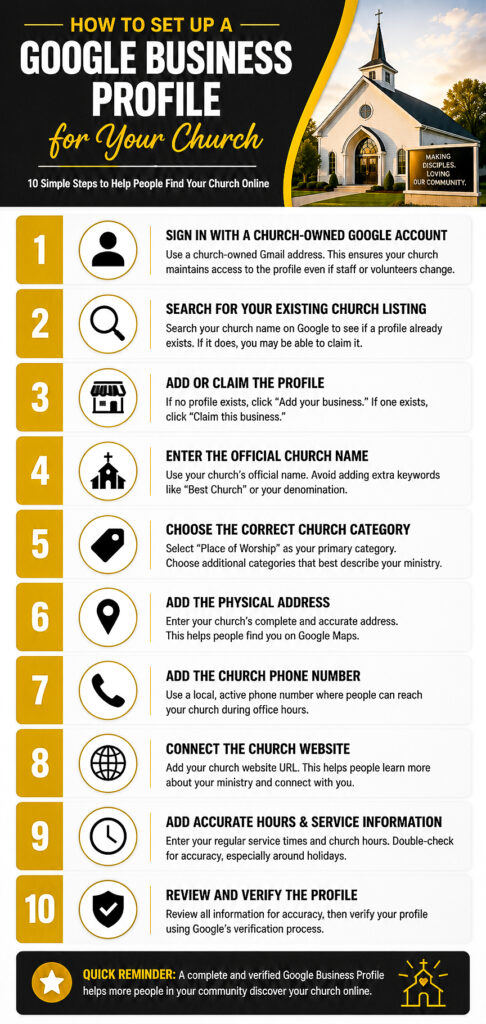
Step 1: Sign In With the Right Google Account
Begin by signing in to the Google account that will manage your church’s profile.
Whenever possible, use an account controlled by the church rather than an individual pastor, staff member, or volunteer.
For example, an account such as:
- admin@yourchurch.org
- communications@yourchurch.org
- office@yourchurch.org
may be easier to manage long term than relying entirely on someone’s personal email address.
You can create a Google account using an existing church email address. It does not always have to end in Gmail.
Make sure the church leadership knows:
- Which account owns the profile
- Who has permission to manage it
- Where the login information is securely stored
- How access will be transferred if staff roles change
This simple step can prevent major access problems later.
Step 2: Search for Your Church Before Creating a New Listing
Before creating anything new, search for your church on Google Search and Google Maps.
Search using:
- Your complete church name
- Your church name and city
- Your church address
- An older church name, if the ministry was recently renamed
Google may already have a listing for your church, even if no one on your current leadership team remembers creating it.
This can happen when:
- A former staff member created the profile
- A volunteer created it years ago
- Google generated information from public sources
- The church changed names or leadership
- A previous organization occupied the building
Do not immediately create a second profile if one already exists.
Duplicate listings can confuse visitors, divide your reviews, display conflicting information, and make the profile more difficult to manage.
What if you find more than one church listing?
Write down the name and web address of each listing. Determine which one contains the most accurate information and reviews before making changes. Avoid claiming or editing several profiles at the same time until you understand why the duplicates exist.
Step 3: Add or Claim Your Church’s Google Business Profile
After checking for an existing listing, visit Google’s official Business Profile setup page:
Add or Claim Your Church on Google
Enter your church name into the search field.
One of two things will normally happen:
Option 1: Your church already appears
Select the existing church listing and follow the instructions to claim or request access to it.
Option 2: Your church does not appear
Choose the option to add your church to Google and continue entering the requested information.
If Google indicates that someone else manages the profile, do not create a replacement listing simply to avoid the ownership process.
Use Google’s option to request access from the current owner.
The current owner may be:
- A former pastor
- A previous staff member
- A volunteer
- A ministry administrator
- A marketing company
Contacting that person directly may be the quickest solution when their identity is known.
Step 4: Enter Your Church’s Real-World Name
Enter the official name your church uses in the real world.
The name should normally match what appears on your:
- Church building or permanent signage
- Website
- Printed materials
- Social media profiles
- Legal or organizational documents
Do not add unnecessary keywords, city names, slogans, service descriptions, or promotional phrases unless they are genuinely part of the church’s established name.
For example, if the church’s real name is:
New Hope Community Church
you should not change the profile name to:
New Hope Community Church | Best Family Church in Oakland
That may look like a creative SEO shortcut, but it does not accurately represent the church’s real-world name.
Hold up a minute! Good church SEO is not about stuffing keywords everywhere. It is about giving Google and your community clear, consistent, and trustworthy information.
Step 5: Choose the Most Accurate Primary Category
Google will ask you to choose a primary category that describes your organization.
For many congregations, the broad category Church may be the most appropriate starting point.
Depending on your congregation and the categories Google currently makes available, you may see more specific options related to your church tradition.
Examples may include:
- Christian Church
- Non-Denominational Church
- Baptist Church
- Pentecostal Church
- Methodist Church
- Presbyterian Church
- Catholic Church
- Evangelical Church
- Apostolic Church
Choose the category that most accurately describes what your organization is.
Your primary category is important because it helps Google understand which searches are relevant to your church.
You may also be able to add additional categories later, but only use categories that genuinely represent your ministry.
Do not select unrelated categories simply because you want to appear in more searches.
Step 6: Add Your Church’s Physical Address
Enter the complete physical address where people attend worship services or visit the church during its stated hours.
Double-check the following details:
- Street number
- Street name
- Suite or unit number, when applicable
- City
- State
- ZIP code
After entering the address, Google may ask you to position a map marker.
Place the marker as accurately as possible on the church building or main public entrance.
This is especially important when:
- The church is located in a large complex
- Several buildings share the same address
- The property has multiple entrances
- The church meets inside a school, hotel, or community center
- Navigation apps regularly send visitors to the wrong entrance
Accurate map placement can make the difference between a visitor arriving comfortably and driving around the neighborhood feeling frustrated.
What if your church meets in a shared or rented location?
A church that meets in a shared location should make sure its listing accurately represents where and when the congregation makes in-person contact with people.
Use the real location where the church regularly gathers, but do not create misleading information or make it appear that your church permanently controls a property when it does not.
You should also make sure visitors can clearly identify the church when they arrive.
This may include:
- Permanent or regularly displayed church signage
- Welcome banners
- Directional signs
- A staffed welcome area
- Clearly communicated meeting times
Step 7: Add Your Church Phone Number
Enter a phone number that represents your church and is regularly monitored.
The best number is usually one that:
- Church leadership controls
- Appears on the church website
- Is answered during listed office hours
- Has a clear voicemail greeting
- Will remain active if a staff member leaves
Avoid using a temporary personal number unless that is genuinely the church’s primary public contact number.
Take a moment to call the number yourself.
Listen to the voicemail greeting and make sure it clearly identifies the church, provides useful information, and allows callers to leave a message.
Step 8: Add Your Church Website
Enter the full web address of your church’s official website.
For most churches, the best link will be the homepage.
Make sure the website:
- Loads correctly
- Uses a secure HTTPS connection
- Works well on mobile devices
- Displays current service times
- Shows the correct church address
- Contains an easy-to-find contact page
- Provides clear information for first-time visitors
Your website and Google Business Profile should communicate consistent information.
If Google shows one worship time but your website shows another, visitors may not know which one to trust.
For more help improving your website, read our guide on why your church website should be mobile-friendly.
Step 9: Add Your Service Times and Office Hours Carefully
Google may allow you to enter operating hours during setup or after the profile has been created.
Churches should think carefully about the difference between:
- Worship service times
- Church office hours
- Prayer meeting times
- Ministry program hours
- Special event times
Your regular profile hours should represent the times when people can reasonably expect the church to be open, staffed, or available for in-person contact.
Do not list the church as open twenty-four hours a day unless someone is genuinely available to receive visitors during those hours.
You can communicate worship service times through:
- Your church description
- Google updates or posts
- Photos and graphics
- Your website
- Event information
During Christmas, Easter, conferences, or other special occasions, review your profile and add special hours when that option is available.
Step 10: Review Your Information Before Continuing
Before submitting the profile, carefully review every field.
Ask yourself:
- Is the church name spelled correctly?
- Is the map marker on the correct building?
- Is the phone number active?
- Does the website link work?
- Are the hours accurate?
- Did we choose the most appropriate category?
- Does this information match our website?
It is much easier to correct mistakes now than to discover them after visitors begin using the profile.
Consistency Builds Trust
Try to keep your church name, address, phone number, website, and service information consistent across your Google Business Profile, website, social media accounts, and online directories.
How Do I Verify My Church’s Google Business Profile?
After entering your church information, Google may require you to verify that you are authorized to manage the organization.
Verification protects your church’s information and helps prevent unauthorized people from taking control of the profile.
Google determines which verification options are available. Depending on the church and location, the available method may include:
- Video recording
- Live video call
- Phone or text
- Another method presented by Google
You may not be able to manually choose every method listed above. Follow the options Google provides on your screen.
Preparing for Video Verification
If Google asks for a video recording, prepare before you begin.
You may be asked to demonstrate that the church exists at the stated location and that you are authorized to represent it.
Depending on Google’s instructions, your video may need to show items such as:
- The surrounding street or nearby landmarks
- The church building exterior
- Permanent church signage
- The main entrance
- Areas not normally accessible to the general public
- Your ability to unlock the building
- Church documents, equipment, or materials that support your connection to the ministry
Follow the instructions shown during the verification process rather than relying only on a general checklist.
Do not include private member information, financial information, passwords, or sensitive documents unless Google specifically requests appropriate proof through an official process.
What if Your Church Cannot Complete Verification?
If the verification method does not work, do not create another profile.
Instead:
- Confirm that you are signed in to the correct Google account.
- Review the church name, address, category, phone number, and website.
- Make sure the location accurately represents where the church meets people in person.
- Follow the troubleshooting options provided inside Google Business Profile.
- Contact Google Business Profile support when the available verification method cannot be completed.
Creating additional listings can make the situation more complicated and may result in duplicate profiles.
What Happens After Verification?
Once your church is verified, you can begin managing and improving the profile.
This may include:
- Editing church information
- Adding photos
- Writing a church description
- Responding to reviews
- Publishing updates
- Adding special hours
- Reviewing profile performance
Verification is not the finish line.
It is the beginning of keeping your church’s online information accurate, active, and helpful.
Action Step: After verification, assign one trusted person to review the profile at least once a month. They should check the hours, phone number, website, photos, reviews, and upcoming special events.
How Can Your Church Optimize Its Google Business Profile?
Congratulations! Once your church’s Google Business Profile has been verified, you have completed an important first step.
But creating your profile is only the beginning.
Think of it like planting a garden. Planting the seeds is important, but you also need to water, maintain, and care for it if you want it to grow.
Your Google Business Profile works the same way.
The churches that consistently appear in local search results often have one thing in common: they actively manage their profiles.
Hold up a minute! A neglected Google Business Profile can send the wrong message. An active profile tells both Google and your community that your church is alive, engaged, and serving people.
Add a Complete Church Description
Your church description is your opportunity to introduce your ministry to someone who has never heard of your church before.
Rather than trying to fill the description with keywords, write naturally and explain who you are.
Consider including:
- Your mission
- Your vision
- The city or community you serve
- Your worship style
- Children’s ministry
- Youth ministry
- Small groups
- Community outreach
Example
Hope Community Church is a Christ-centered church serving families throughout Sacramento, California. We are passionate about helping people grow in their relationship with Jesus through biblical teaching, authentic worship, children’s ministry, youth programs, small groups, and community outreach. Whether you are new to church or looking for a church home, we would love to welcome you this Sunday.
Upload High-Quality Photos
Photos are one of the first things potential visitors notice.
Instead of asking yourself, “What pictures do we have?” ask, “What would a first-time guest want to see?”
Recommended Photos
- Church exterior
- Main entrance
- Parking area
- Welcome center
- Sanctuary
- Worship service
- Children’s ministry
- Youth ministry
- Small groups
- Pastor preaching
- Community outreach
- Baptisms
- Special events
- Volunteer teams
Use bright, high-resolution photos that accurately represent your church.
Avoid blurry images or photos taken many years ago if your church looks significantly different today.
Keep Your Service Times Updated
Nothing frustrates a first-time visitor more than arriving at the wrong time.
Whenever your service schedule changes, update your Google Business Profile immediately.
Be especially careful around:
- Christmas
- Easter
- Thanksgiving
- Special conferences
- Vacation Bible School
- Holiday weekends
Google allows many organizations to publish special hours during holidays.
Encourage Google Reviews
Reviews help build trust with people who have never visited your church.
They also provide valuable feedback about your ministry.
Consider encouraging members to leave an honest review after they have attended your church for a while.
Never purchase reviews or ask people to leave reviews if they have never attended your church.
A Simple Way to Ask
If our church has been a blessing to you, would you consider leaving a Google review? Your experience could help someone else who is looking for a church home.
Whenever possible, respond politely to every review, whether it is positive or negative.
People often read your responses just as carefully as they read the reviews themselves.
Post Regular Updates
Many churches do not realize they can publish updates to their Google Business Profile.
These updates help keep your profile fresh and provide visitors with current information.
You might post about:
- Upcoming sermon series
- Vacation Bible School
- Community outreach
- Prayer nights
- Baptisms
- Marriage conferences
- Holiday services
- Special guest speakers
- Youth events
- Church anniversaries
You do not need to post every day.
Even one update each week demonstrates that your church is active.
Answer Questions Promptly
Google allows people to ask questions directly on your Business Profile.
Questions often include:
- What time is service?
- Is childcare available?
- Is parking free?
- Do you livestream services?
- What should I wear?
Check your profile regularly so these questions do not go unanswered.
Quick, helpful responses create confidence before visitors ever arrive.
Monitor Your Profile Monthly
Set aside fifteen minutes once each month to review your profile.
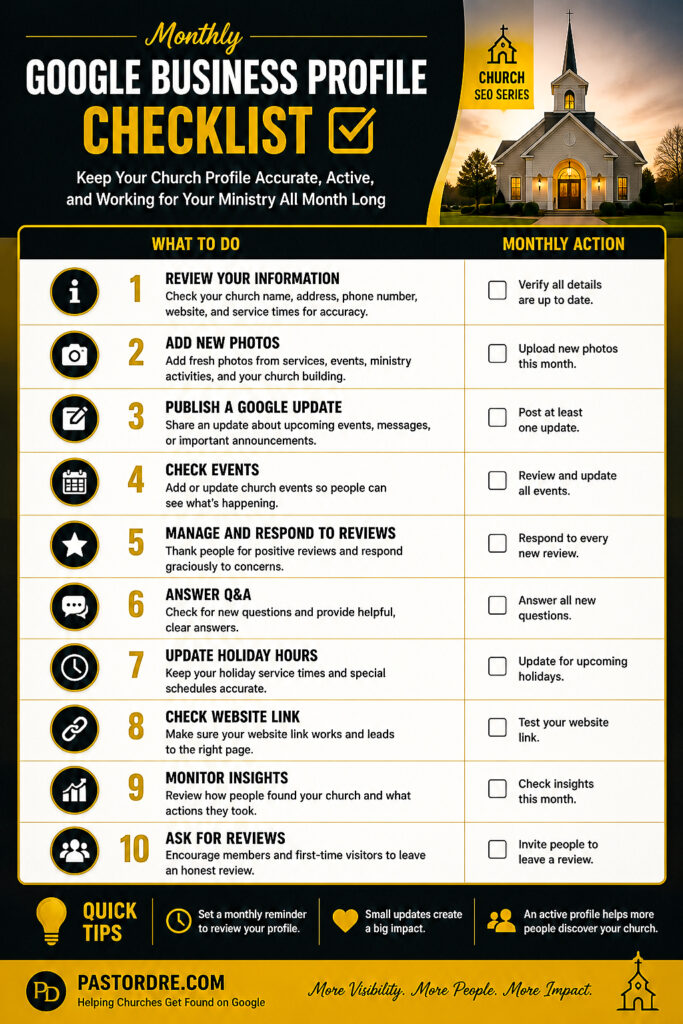
Monthly Church Google Business Profile Checklist
- Review church hours
- Verify phone number
- Check website link
- Add new photos
- Respond to reviews
- Answer questions
- Publish an update
- Review map location
- Confirm service times
- Update holiday hours if needed
Quick Leadership Tip
Assign one trusted volunteer or media team member to manage your Google Business Profile each month. Consistency is more important than spending hours making changes all at once.
How Your Google Business Profile Supports Church SEO
Your Google Business Profile does not replace your church website.
Instead, the two work together.
When your profile links to a helpful, mobile-friendly website that is regularly updated with quality content, you are creating a stronger digital presence.
If you are serious about helping more people discover your church online, consider these additional resources:
- Why Every Church Needs a Blog
- Using Google Search Console for Church Website Insights
- Church Website Analytics Tools for Growth
- Digital Outreach Strategies for Churches
The more helpful and accurate information your church provides online, the easier it becomes for people in your community to discover your ministry.
Common Mistakes Churches Make with Their Google Business Profile
Creating a Google Business Profile is an important first step, but keeping it accurate and up to date is just as important.
Over the years, I have reviewed many church websites and online listings. Some churches have excellent profiles, while others unintentionally make mistakes that can confuse visitors or make it harder for people to find them.
Here are some of the most common issues to avoid.
1. Leaving the Profile Incomplete
An incomplete profile may leave visitors with unanswered questions. Fill out every section you can, including your church description, phone number, website, service times, photos, and ministry information.
2. Using Outdated Service Times
If your worship schedule changes, update your profile as soon as possible. Few things are more discouraging than someone arriving for a service that ended an hour earlier.
3. Forgetting to Add New Photos
Photos help first-time visitors feel familiar with your church before they arrive. Refresh your gallery throughout the year with current images from worship services, outreach events, and ministry activities.
4. Ignoring Google Reviews
People notice when churches respond with kindness and appreciation. Thank people for positive reviews and respond graciously to concerns whenever appropriate.
5. Creating Duplicate Listings
Before creating a new profile, always search for an existing one. Duplicate listings can confuse visitors, split your Google reviews, and make it more difficult to keep your church information accurate and consistent.
6. Using a Personal Google Account
Whenever possible, use a church-controlled Google account instead of a personal account belonging to one individual.
7. Never Publishing Updates
Regular updates let visitors know your church is active and engaged in the community.
8. Forgetting to Check the Profile
Set a monthly reminder to review your profile and make sure everything is still accurate.
Quick Reminder: Your Google Business Profile is often the first impression someone has of your church. A few minutes of maintenance each month can make a big difference.
Frequently Asked Questions
Is Google Business Profile free for churches?
Yes. Google Business Profile is free to create and manage. There is no cost to claim your church listing or appear on Google Maps.
Can my church appear on Google Maps?
Yes. Once your profile has been created, verified, and meets Google’s requirements, your church may appear in Google Maps and local search results.
How long does verification take?
The timeframe varies depending on the verification method Google provides. Some churches may complete verification quickly, while others may need additional time.
Can more than one person manage the profile?
Yes. Google allows profile owners to add additional managers, making it easier for pastors, administrators, or media team members to help maintain the listing.
How often should we update our Google Business Profile?
Review your profile at least once each month. Update service times, holiday hours, photos, events, and contact information whenever changes occur.
Can churches receive Google reviews?
Yes. Members and visitors can leave reviews based on their experience. Encourage honest feedback and respond professionally to every review.
What if someone else owns our church’s listing?
If another person manages your church’s profile, you can request access through Google Business Profile. Avoid creating a duplicate listing.
Do online-only churches qualify?
Google’s eligibility requirements focus on organizations that have in-person contact with the public. Review Google’s current Business Profile guidelines to determine whether your ministry qualifies.
What Should You Do After Your Google Business Profile Is Live?
Publishing your Google Business Profile is a major accomplishment, but it is only the beginning.
To keep your profile working for your church, make it part of your monthly ministry routine.
- Review your church information every month.
- Add new photos from recent services and events.
- Publish at least one Google update each week.
- Respond to every Google review.
- Update holiday service times.
- Ask first-time visitors how they found your church.
- Monitor website traffic from your Google Business Profile.
- Continue improving your church website and local SEO.
Small, consistent updates can make a meaningful difference over time. Rather than setting up your profile and forgetting about it, treat it as an extension of your church’s hospitality.
The more accurate and welcoming your profile is, the easier it becomes for people in your community to discover your church.
Your Church’s Digital Front Door Matters
Before someone ever attends your church, they often visit you online first.
They may read your Google reviews, browse your photos, visit your website, and look up your service times before deciding whether to attend.
That is why your Google Business Profile is much more than an online listing.
It is part of your church’s digital front door.
When your information is accurate, your photos are welcoming, and your profile is actively maintained, you make it easier for people to take that important first step through your doors.
Remember, church SEO is not about trying to manipulate search engines.
It is about helping people who are searching for hope find a local church where they can experience the love of Christ.
Hold up a minute! Every week, people in your community search for a church. A well-maintained Google Business Profile helps ensure that when they search, they have a better opportunity to discover yours.
Continue Learning Church SEO
Setting up a Google Business Profile is one of the best first steps you can take, but it is only one piece of helping your church become more visible online.
If you would like to learn how Google Search works, how to improve your church website, and how to help more people discover your ministry online, I have created a free training designed specifically for pastors and church leaders.
Start the Free Church SEO Training
Helpful Resources for Church Leaders
If you found this guide helpful, here are a few additional resources that can help your church strengthen its online presence: