
Many churches want to grow.
They want to reach more people, connect with first-time guests, strengthen their online presence, and help more people take their next step with God.
But here’s the challenge.
A lot of churches are doing digital outreach without really knowing what is working.
They post on social media.
They update their website.
They promote events.
They upload sermons.
They write blogs.
They send emails.
But when it comes to understanding what people are actually doing on the church website, many churches are still guessing.
That’s where Google Analytics 4 can help.
Google Analytics 4, also called GA4, helps churches understand how people interact with their website after they arrive. It can show which pages people visit, how long they stay, where they came from, what devices they use, and whether they take important next steps.
Hold up a minute! GA4 is not about turning ministry into a spreadsheet.
It’s about stewardship.
If God is bringing people to your church website, it helps to know what they are doing once they get there.
Are they finding your service times?
Are they visiting your Plan Your Visit page?
Are they reading your blog articles?
Are they clicking on ministry pages?
Are they registering for events?
Are they leaving before taking action?
These are the kinds of questions Google Analytics 4 can help answer.
If you have not installed GA4 yet, I recommend starting with our guide on Google Analytics 4 setup for churches before diving into this article. Once GA4 is connected to your website, this guide will help you understand how to use that data to make better ministry decisions.
The goal is not to chase numbers.
The goal is to better understand the people visiting your website so your church can serve them with more clarity, wisdom, and purpose.
What Does Google Analytics 4 Have to Do With Church Growth?
Google Analytics 4 will not grow your church by itself.
It will not preach the Gospel.
It will not disciple people.
It will not replace prayer, leadership, community, or the work of the Holy Spirit.
But it can help your church make better decisions about your online ministry.
Think about it this way.
If someone walks into your church building on a Sunday morning, you want to make sure they know where to go.
You want them to find the sanctuary.
You want them to see where to check in their children.
You want them to meet someone friendly.
You want them to feel welcomed, seen, and cared for.
Your church website works the same way.
For many people, your website is the first place they visit before they ever attend a service.
Google Analytics 4 helps you understand that digital first impression.
It can help you see:
- Which pages people visit first
- Which pages keep people engaged
- Which pages people leave from
- Which outreach channels bring visitors to your website
- Which content is helping people take the next step
- Whether mobile visitors are having a good experience
This matters because church growth is not only about getting more attention.
It is about helping people move from curiosity to connection.
Someone may search for a church near them.
Then they visit your website.
Then they look for service times.
Then they read about your ministries.
Then they watch a sermon.
Then they plan a visit.
That is a digital pathway.
GA4 helps you see parts of that pathway so you can improve it.
If visitors are coming to your website but not taking the next step, GA4 can help reveal where the disconnect may be.
Maybe your homepage is getting traffic, but people are not clicking to your Plan Your Visit page.
Maybe your events page is getting views, but registrations are low.
Maybe your blog articles are attracting readers, but there is no clear call to action.
Maybe most visitors are on mobile, but your mobile layout is hard to use.
These are not just website problems.
They are ministry opportunities.
When your church understands how people are using your website, you can make changes that remove barriers and make it easier for people to connect.
That is how Google Analytics 4 can support church growth.
Not by replacing ministry, but by helping your ministry make wiser digital decisions.
The Digital Front Door: What Visitors Do After They Arrive
For many people, your church website is the digital front door of your ministry.
Before they ever walk into your building, they may visit your homepage, read your About page, check your service times, look at your ministries, watch a sermon, or see if your church feels like a place where they could belong.
That first online visit matters.
Think about what happens when someone walks into your church building for the first time.
You want them to feel welcomed.
You want them to know where to go.
You want signs to be clear.
You want someone to greet them.
You want them to find the sanctuary, the children's ministry, the restrooms, and any important information they need.
Now think about your website the same way.
When someone lands on your church website, can they quickly find what they are looking for?
Can they find your service times?
Can they find your location?
Can they learn what to expect?
Can they understand what your church believes?
Can they take a next step without feeling confused?
Google Analytics 4 helps churches answer those questions by showing what visitors do after they arrive.
It can help you see which pages people visit first, which pages they spend time on, and which pages they leave from.
That information matters because your website should not only inform people.
It should guide people.
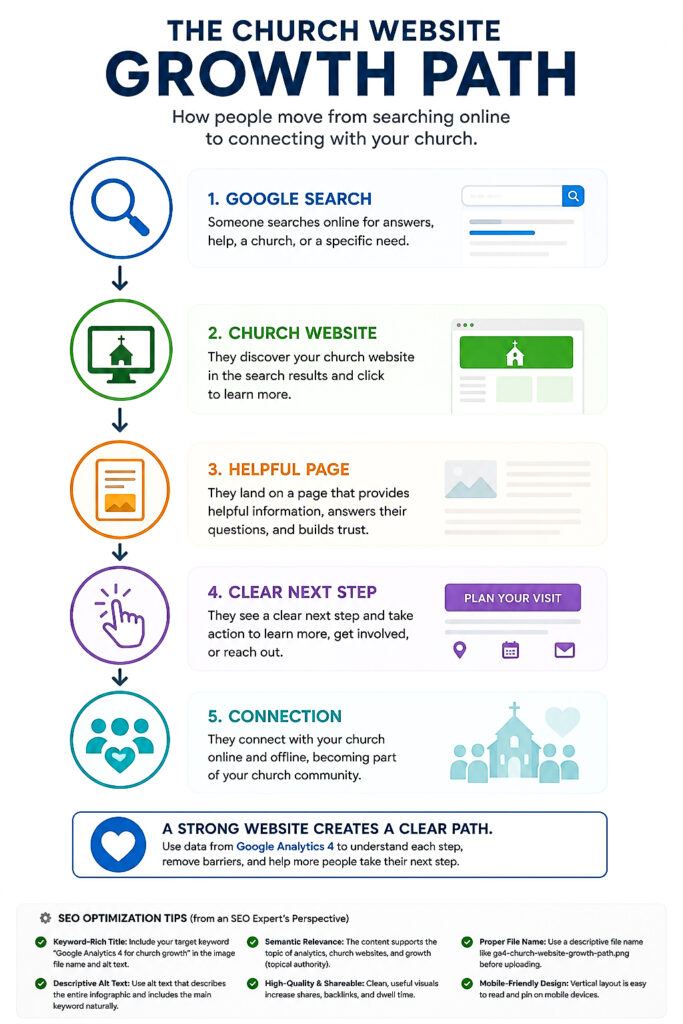
Your Website Should Create a Clear Path
A healthy church website should help visitors move from interest to connection.
That path might look something like this:
- Someone finds your church through Google Search.
- They land on your homepage or a blog article.
- They visit your Plan Your Visit page.
- They check your service times and location.
- They watch a sermon or read about your ministries.
- They decide to attend, contact the church, or take another next step.
That is the kind of digital pathway churches should pay attention to.
Google Analytics 4 helps you see whether people are moving through that pathway or getting stuck along the way.
For example, if many visitors land on your homepage but very few click to your Plan Your Visit page, that may be a sign that your homepage needs a stronger call to action.
If people visit your events page but do not register, the registration button may need to be clearer.
If visitors are reading blog articles but not exploring other pages, you may need better internal links or a stronger next step at the end of each article.
Hold up a minute! These are not just website design issues.
They are connection issues.
Every unclear button, confusing menu, missing link, or buried service time can become a barrier for someone who is trying to connect with your church.
GA4 Helps You See Where People Are Engaging
Google Analytics 4 can show you which pages are helping people stay engaged.
This may include:
- Your homepage
- Plan Your Visit page
- About page
- Sermon pages
- Blog articles
- Events page
- Ministry pages
- Giving page
- Contact page
When you review these pages in GA4, do not just ask, “Which page got the most views?”
Ask better questions.
Which pages are helping visitors stay longer?
Which pages are leading people to explore more of the website?
Which pages are connected to important next steps?
Which pages may need to be improved?
This is where church growth and website analytics begin to work together.
If your website is getting visitors, that is good.
But if visitors are not finding clear next steps, your website may not be serving them as well as it could.
Google Analytics 4 gives you clues.
Those clues can help your church improve the digital front door so more people can move from searching to connecting.
Use GA4 to Find Pages That Help People Take the Next Step
One of the best ways churches can use Google Analytics 4 for church growth is by finding the pages that already have people’s attention.
Not every page on your website carries the same weight.
Some pages are more important because they help visitors take action.
These are the pages that can move someone from being curious to becoming connected.
For most churches, important website pages may include:
- Homepage
- Plan Your Visit page
- About page
- Service Times page
- Ministries page
- Events page
- Sermon page
- Contact page
- Giving page
- Blog articles
When you look at these pages inside Google Analytics 4, you are not just looking at website traffic.
You are looking for ministry opportunities.
Start With Your Most Visited Pages
A simple place to begin is by asking:
Which pages are people visiting the most?
Your most visited pages are important because they already have attention.
If a page is getting traffic, that page should be clear, helpful, and connected to a next step.
For example, if your homepage is one of your most visited pages, ask:
- Is the service time easy to find?
- Is the location clear?
- Is there a visible Plan Your Visit button?
- Can someone quickly understand who we are?
- Is the page mobile-friendly?
If your blog articles are getting traffic, ask:
- Do they link to related articles?
- Do they invite people to take a next step?
- Do they point people toward a ministry, resource, or church service?
- Do they answer the question the visitor came to ask?
If your events page is getting traffic, ask:
- Is the event information clear?
- Is the date easy to see?
- Is the registration button easy to find?
- Does the page explain who the event is for?
Hold up a minute! A page that already gets visitors is like a room in your church building that people keep walking into.
If people keep walking into that room, you want to make sure it is clean, clear, welcoming, and helpful.
The same is true for your website.
Improve the Pages That Already Have Attention
This is one of my favorite church website growth strategies.
Before creating more pages, improve the pages people are already visiting.
Sometimes churches think the answer is always more content.
More blog articles.
More pages.
More announcements.
More posts.
But sometimes the better move is to strengthen what is already working.
If Google Analytics shows that a page is receiving traffic, that page deserves attention.
You may need to:
- Improve the headline
- Add a stronger call to action
- Add internal links
- Update the content
- Add a helpful image
- Make the page easier to scan
- Improve the mobile layout
- Add a video
- Clarify the next step
These improvements may seem small, but they can make a big difference.
A clearer button can help someone plan a visit.
A better internal link can help someone discover another helpful article.
A stronger ministry page can help a family decide to attend.
A clearer event page can increase registrations.
This is how GA4 becomes practical.
It helps you stop guessing and start improving the places where people are already showing interest.
Look for Pages With Traffic but Low Engagement
Another helpful strategy is to look for pages that get visitors but do not keep them engaged.
This may be a sign that something on the page needs to be improved.
Maybe the title promised one thing, but the page delivered something different.
Maybe the page loads too slowly.
Maybe the content is too thin.
Maybe the page is hard to read on mobile.
Maybe the visitor could not find the next step.
When you find a page with traffic but weak engagement, do not immediately see it as a failure.
See it as an opportunity.
That page is already getting attention.
Now your job is to make it more helpful.
Every Important Page Should Have a Next Step
A church website should not leave visitors wondering what to do next.
Every important page should gently guide people forward.
That next step might be:
- Plan your visit
- Contact the church
- Register for an event
- Watch a sermon
- Read another article
- Join an email list
- Request prayer
- Learn about a ministry
- Download a resource
The goal is not to pressure people.
The goal is to serve them.
When someone visits your website, they may be searching for answers, encouragement, community, or a church home.
Google Analytics 4 helps you understand which pages they are visiting.
Your job is to make sure those pages help them take the next faithful step.
Use GA4 to Measure Digital Outreach
Churches are doing more digital outreach than ever before.
They are posting on social media.
They are uploading sermons to YouTube.
They are sending emails.
They are creating blog articles.
They are promoting events online.
They are trying to reach people beyond the four walls of the church building.
That is a good thing.
But one important question still needs to be answered:
Is your digital outreach actually bringing people back to your church website?
Google Analytics 4 can help answer that question.
GA4 shows where your website visitors are coming from. This helps your church understand which online efforts are creating movement and which ones may need more attention.
Know Where Your Visitors Are Coming From
Inside Google Analytics 4, you can look at your traffic sources.
This shows how people arrived on your website.
Some visitors may come from:
- Google Search
- YouTube
- Email newsletters
- Direct visits
- Other websites
- Online directories
This matters because every outreach channel tells a story.
If Google Search is bringing steady traffic, your SEO and blog content may be working.
If YouTube is bringing visitors, your videos may be helping people take the next step.
If email is sending traffic, your list is staying engaged.
If social media is bringing visitors, your posts may be moving people from scrolling to exploring.
Hold up a minute! The goal is not just to get likes, views, or comments.
The goal is to help people move closer to connection.
A post may get attention on social media, but GA4 can help you see whether that attention led people to visit your website, read more, register, watch, contact, or plan a visit.
Measure What Happens After the Click
Digital outreach does not stop when someone clicks a link.
The click is only the beginning.
The real question is:
What happened after they arrived?
For example:
- Did they visit your Plan Your Visit page?
- Did they watch a sermon?
- Did they read another article?
- Did they register for an event?
- Did they fill out a contact form?
- Did they leave after a few seconds?
This is where GA4 becomes extremely valuable.
It helps churches move beyond surface-level numbers.
Instead of only asking, “How many people saw the post?” you can begin asking, “Did this outreach help someone take a meaningful next step?”
That is a better question.
Compare Outreach Channels
Not every digital platform will produce the same results.
Your church may discover that Facebook brings a lot of traffic, but visitors leave quickly.
You may discover that Google Search brings fewer visitors, but those visitors spend more time reading and exploring.
You may discover that email does not bring huge traffic, but the people who click are highly engaged.
You may discover that YouTube sends visitors who spend more time on sermon pages.
These insights help your church make wiser decisions.
Instead of trying to do everything everywhere, you can focus more attention on what is actually helping people connect.
That does not mean you abandon every platform that is not producing immediate results.
It simply means you make decisions with more clarity.
Use GA4 to Strengthen Your Outreach Strategy
Google Analytics 4 can help your church improve digital outreach by showing you what is working.
For example:
If blog articles are bringing people from Google Search, create more helpful articles around the questions people are already asking.
If YouTube is sending visitors to your website, add clearer links in your video descriptions and mention the next step in your videos.
If social media posts are driving traffic to an event page, make sure that event page is clear, mobile-friendly, and easy to register from.
If emails are sending people to your website, make sure each email has one clear call to action.
This is how digital outreach becomes more intentional.
You are not just posting because it is time to post.
You are creating a clear path from outreach to connection.
Digital Outreach Should Lead Somewhere
One of the biggest mistakes churches make is creating online content without a clear destination.
A church might post a great announcement, sermon clip, event flyer, or devotional thought, but rarely guide people to a next step.
Google Analytics 4 helps reveal whether your outreach is leading people somewhere meaningful.
Your website should become the hub.
Social media can create awareness.
YouTube can build trust.
Email can nurture relationships.
Google Search can bring in people looking for answers.
But your website should help bring those efforts together and guide people toward connection.
That is why GA4 is so helpful.
It shows whether your digital outreach is sending people to your church website and whether your website is helping them move forward.
When your church creative team understands that, you can stop guessing and start building a more intentional digital ministry strategy.
Use GA4 to Track Ministry Actions, Not Just Website Traffic
Website traffic is helpful, but traffic alone does not tell the whole story.
A church website can receive visitors every week, but the deeper question is:
Are people responding?
That is where Google Analytics 4 can help your church look beyond page views.
A page view tells you someone arrived.
A click tells you someone showed interest.
A form submission tells you someone took a step.
An event registration tells you someone responded.
A prayer request tells you someone reached out.
For churches, these actions matter because they show movement.
Some ministry actions your church may want to pay attention to include:
- Plan Your Visit clicks
- Contact form submissions
- Prayer requests
- Event registrations
- Giving page clicks
- Sermon views
- Email signups
- Resource downloads
- Clicks for directions
You do not need to track everything at once.
Start with three to five actions that matter most for your ministry right now.
For example, if your church is focused on reaching first-time guests, you may want to watch Plan Your Visit clicks, contact form submissions, and clicks for directions.
If your church is promoting outreach events, you may want to watch event registrations, email signups, and traffic to your events page.
If your church is creating more online content, you may want to watch sermon views, blog engagement, and resource downloads.
Hold up a minute! The goal is not to turn ministry into a scoreboard.
The goal is to understand whether your website is helping people move forward.
When your church creative team knows which actions matter most, they can build clearer pages, stronger buttons, better links, and more helpful content.
That is how GA4 becomes practical.
It helps your church see where people are responding, where they may be getting stuck, and what needs to be improved next.
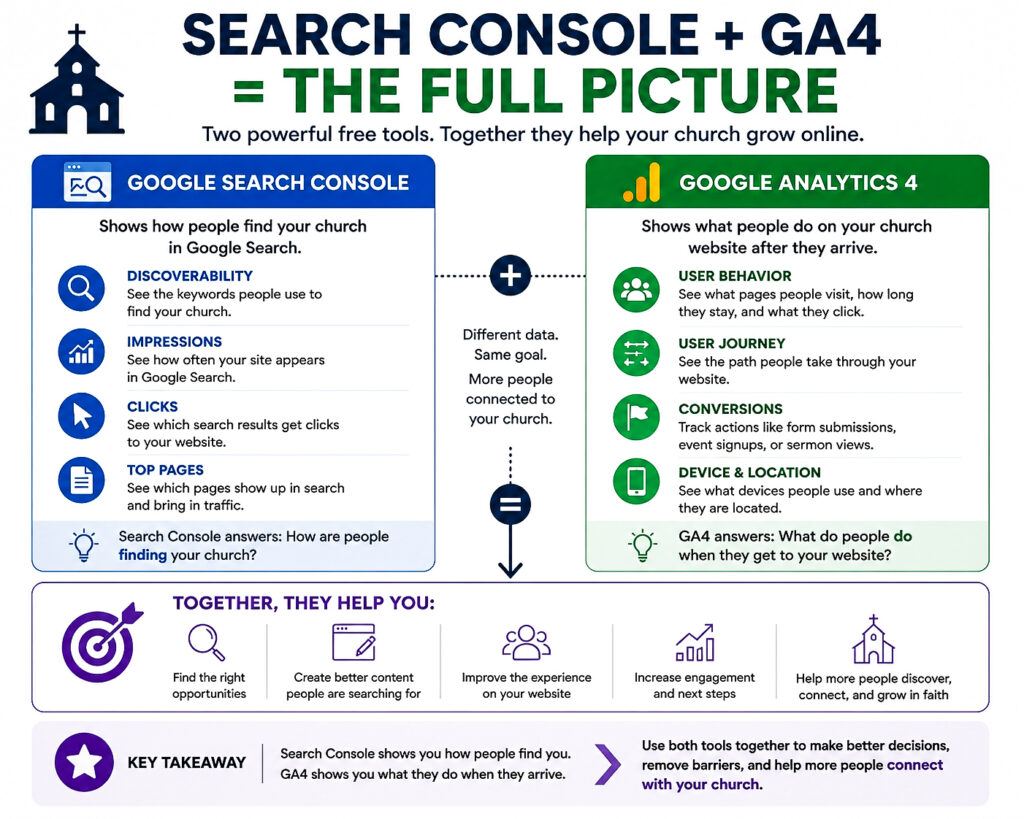
Use GA4 With Google Search Console for the Full Picture
Google Analytics 4 is powerful, but it becomes even more valuable when you use it with Google Search Console.
These two tools work together, but they do not do the same job.
Google Search Console helps you understand how people found your church through Google Search.
Google Analytics 4 helps you understand what people did after they arrived on your website.
That difference matters.
Think of it this way.
Google Search Console shows the road people took to find your church website.
GA4 shows what they did once they walked through the digital front door.
Together, they give your church a much clearer picture.
Google Search Console Shows How People Found You
Google Search Console helps answer questions like:
- What keywords are people searching for?
- Which pages are showing up in Google?
- How many impressions are your pages getting?
- How many people are clicking?
- What is your average position?
- Is Google indexing your pages correctly?
This helps your church understand visibility.
It shows whether Google is testing your pages, where your content is showing up, and what search terms are connected to your website.
For example, Search Console may show that one of your blog articles is getting a lot of impressions but very few clicks.
That is a clue.
It may mean the title needs to be stronger.
It may mean the meta description needs to be clearer.
It may mean the article needs a better featured image or stronger introduction.
Search Console helps you find the opportunity.
GA4 Shows What Visitors Did Next
Once people arrive on your website, Google Analytics 4 helps you understand their behavior.
GA4 can help answer questions like:
- Which pages did visitors view?
- How long did they stay?
- Did they visit another page?
- Did they click a button?
- Did they watch a sermon?
- Did they register for an event?
- Did they leave without taking action?
This helps your church understand engagement.
A page may be getting traffic from Google, but GA4 helps you see whether that traffic is actually helpful.
Are people staying?
Are they exploring?
Are they responding?
Are they taking the next step?
That is the kind of information that helps your church make better decisions.
Use Both Tools Before Making Changes
Hold up a minute! One tool gives you part of the story.
Both tools give you a better picture.
Let’s say Google Search Console shows that a blog article is getting 1,000 impressions but only a few clicks.
That tells you people are seeing the article in Google, but not many are choosing to visit.
You may decide to improve the title, meta description, or opening hook.
Now let’s say GA4 shows that the people who do click are staying on the page for several minutes and visiting other pages afterward.
That tells you the content itself is useful.
In that case, the problem may not be the article.
The problem may be how the article appears in search results.
On the other hand, if Search Console shows that a page is getting clicks, but GA4 shows people leave quickly, the issue may be the page experience.
Maybe the content needs to be stronger.
Maybe the next step is not clear.
Maybe the page loads slowly.
Maybe the visitor expected one thing and found something else.
That is why using both tools together is so helpful.
If you want to go deeper into how Google Search Console helps churches understand what people are searching for, watch this short lesson from the course.
This Is How You Renovate the Right Pages
One of the best website growth strategies is not always creating something new.
Sometimes the better strategy is improving the page that is already getting attention.
Google Search Console helps you find pages Google is already testing.
Google Analytics 4 helps you see whether those pages are serving visitors well.
Together, they help your church decide what to improve first.
Instead of guessing, your church can ask:
- Which pages are getting impressions?
- Which pages are getting clicks?
- Which pages are keeping visitors engaged?
- Which pages are helping people take action?
- Which pages need a clearer next step?
That is how your church creative team can work smarter.
You are not just updating pages because they feel old.
You are improving pages because the data shows they have opportunity.
When Google Search Console and GA4 work together, your church can make better decisions, strengthen your website, and create a clearer path for people who are searching online.
A Simple Weekly GA4 Routine for Churches
One reason many churches stop using Google Analytics 4 is because it feels overwhelming.
There are reports, charts, numbers, filters, events, traffic sources, and more.
But your church does not need to review every report every week.
You just need a simple routine.
A 15-minute weekly check-in can help your church understand what is happening on your website and decide what needs attention next.
Hold up a minute! The goal is not to become obsessed with analytics.
The goal is to build awareness.
When your church creative team reviews website data consistently, you begin to notice patterns.
You see what people are reading.
You see where visitors are coming from.
You see which pages are helping people stay engaged.
You see where people may be dropping off.
Those insights can help your church make better decisions one step at a time.
Step 1: Review Your Top Pages
Start by looking at the pages people visited most during the past week or month.
Pay attention to pages like:
- Homepage
- Plan Your Visit page
- Sermon pages
- Blog articles
- Events page
- Ministry pages
- Contact page
Ask:
Which pages are getting the most attention?
If a page is receiving traffic, make sure it is clear, helpful, updated, and connected to a next step.
Step 2: Check Where Visitors Came From
Next, review your traffic sources.
This helps your church understand which outreach efforts are bringing people to the website.
Look for traffic from:
- Google Search
- YouTube
- Direct visits
- Other websites
Ask:
Which channels are helping people discover our church online?
This helps your team understand where your digital outreach is creating movement.
Step 3: Look at Engagement
Traffic is helpful, but engagement tells you whether people are staying.
Look for pages where visitors spend time, explore, or continue to another page.
Ask:
Which pages are keeping people engaged?
If a page has strong engagement, study it.
What makes it helpful?
Is the topic relevant?
Is the headline strong?
Is the page easy to read?
Does it answer a question people are asking?
Those clues can help you create better content in the future.
Step 4: Look for Pages That Need Improvement
Not every page will perform well.
That is okay.
The goal is not perfection.
The goal is progress.
Look for pages that receive visits but do not seem to keep people engaged.
Ask:
Where might visitors be getting stuck?
A page may need:
- A clearer headline
- Better formatting
- Updated information
- A stronger call to action
- Better internal links
- A clearer button
- A more mobile-friendly layout
Small improvements can make a big difference over time.
Step 5: Choose One Improvement for the Week
This is where many churches miss it.
They look at the data, but they do not act on it.
Do not try to fix everything at once.
Choose one improvement each week.
That might be:
- Updating a page headline
- Adding a Plan Your Visit button
- Improving an event page
- Adding an internal link to a blog article
- Making service times easier to find
- Adding a sermon video to a page
- Simplifying a contact form
One small improvement each week may not feel dramatic, but over time, those improvements add up.
A Simple Weekly Checklist
Here is a simple routine your church can follow:
- Review your top pages.
- Check where visitors came from.
- Look at engagement.
- Identify one page that needs improvement.
- Choose one action to take this week.
That is enough to get started.
Your church does not need to master every GA4 report before making progress.
You just need to pay attention, make thoughtful improvements, and keep moving forward.
When your team builds this habit, Google Analytics 4 becomes less intimidating and more useful.
It becomes a simple tool that helps your church better understand your website, strengthen your digital outreach, and serve people with greater clarity.
Frequently Asked Questions About Google Analytics 4 and Church Growth
What are the benefits of Google Analytics 4 for churches?
Google Analytics 4 helps churches understand how people interact with their website.
It can show where visitors come from, which pages they visit, how long they stay, what devices they use, and whether they take important actions.
For churches, this matters because your website is often the first place people visit before attending a service.
GA4 helps your church make better decisions about website content, digital outreach, event promotion, and first-time visitor experience.
Why is Google Analytics 4 important for church leaders?
Google Analytics 4 is important because it helps church leaders move from guessing to understanding.
Instead of wondering whether the website is helping people connect, leaders can look at real data.
They can see which pages are working, which outreach channels are bringing visitors, and where the website may need improvement.
This helps churches make wiser decisions with their time, content, and communication.
How do I set up Google Analytics 4 for my church?
To set up Google Analytics 4 for your church, you need to create a Google Analytics account, create a GA4 property, add your church website as a data stream, install the tracking code, and verify that data is being collected.
If you need help with the setup process, read our step-by-step guide on Google Analytics 4 setup for churches.
How can Google Analytics 4 help with church attendance?
Google Analytics 4 does not directly increase church attendance by itself.
However, it can help your church understand whether people are finding the information they need before visiting.
For example, GA4 can show whether visitors are viewing your Plan Your Visit page, checking service times, clicking for directions, watching sermons, or reading about your ministries.
When your church improves those digital pathways, it can make it easier for someone to take the next step and attend.
When should a church start using Google Analytics 4?
A church should start using Google Analytics 4 as soon as it has a website.
Even if your church website is small, GA4 can begin collecting helpful information over time.
The sooner you install it, the sooner your church can understand what visitors are doing and make better decisions about website updates, content, outreach, and ministry communication.
Final Thoughts: Use Data to Serve People Better
Google Analytics 4 is not just a tool for marketers.
It can be a valuable tool for churches that want to better understand how people are interacting with their website.
But remember, the goal is not to become obsessed with numbers.
The goal is to serve people better.
Every visit to your church website represents someone.
Someone may be searching for a church home.
Someone may be looking for encouragement.
Someone may be checking service times.
Someone may be wondering if they would feel welcome.
Someone may be looking for prayer, community, or hope.
Google Analytics 4 helps your church see how people are moving through your digital front door.
It shows which pages are getting attention, which outreach efforts are bringing visitors, and which parts of your website may need improvement.
When your church understands that information, you can make better ministry decisions.
You can improve important pages.
You can strengthen your digital outreach.
You can make next steps clearer.
You can help first-time visitors find what they need.
You can create a better online experience for the people God is already bringing to your website.
Hold up a minute! Data does not replace prayer, compassion, leadership, or the work of the Holy Spirit.
But data can help your church steward its digital ministry with greater clarity.
If your church has already installed GA4, begin with a simple weekly routine.
Review your top pages.
Look at where visitors are coming from.
Pay attention to engagement.
Choose one improvement to make.
Then keep going.
Small improvements made consistently can create a stronger website over time.
And a stronger website can create more opportunities for people to discover your church, learn about your ministry, and take that next step toward giving their life to Jesus.
If you have not set up Google Analytics 4 yet, start with our step-by-step guide on Google Analytics 4 setup for churches.
You can also explore our church website analytics tools guide to learn how GA4, Google Search Console, and other tools work together to help your church understand and improve its online presence.
Your website is more than a digital brochure.
It is part of your ministry.
And when you use Google Analytics 4 wisely, it can help your church make better decisions, remove barriers, and serve people with greater purpose.