
A QR code can help your church connect printed materials, presentation screens, signs, and in-person ministry experiences with helpful online information.
Instead of asking someone to type a long website address into their phone, you can allow them to scan a small code and immediately open the page you want them to visit.
Your church might use a QR code to help people:
- Register for a church event
- Submit a prayer request
- Plan their first visit
- Join a ministry or volunteer team
- Access sermon notes
- Visit an online giving page
- Leave an honest Google review
- Open your church website
The technology may sound complicated, but creating a QR code for your church can be a simple process.
In this guide, we are going to walk step by step through how to generate a church QR code, customize it, test it, and place it where people can easily scan it.
We will also look at practical ways churches can use QR codes for events, guest follow-up, Google reviews, giving, prayer requests, and digital outreach.
If your church is still developing its overall online strategy, begin with our guide on how to create a digital outreach strategy for your church.
How Do I Create a QR Code for My Church?
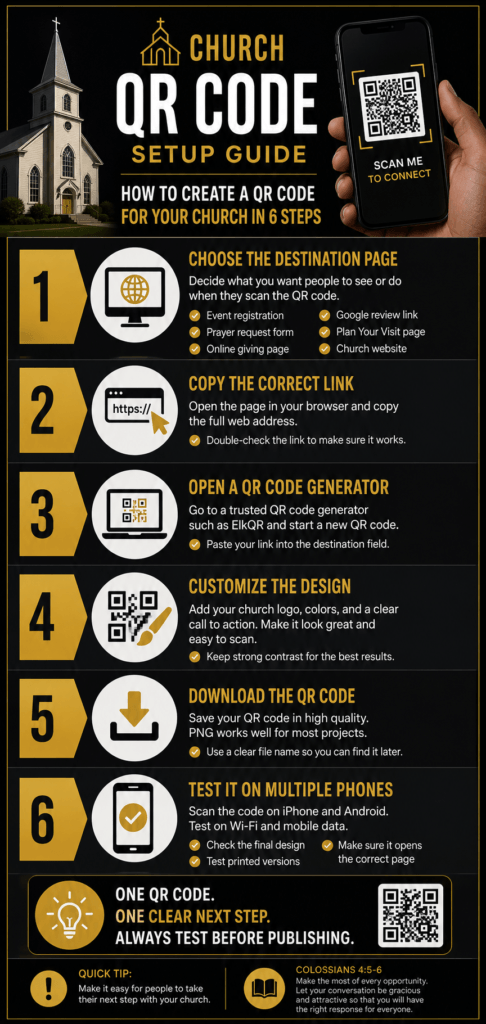
To create a QR code for your church, first decide which online page you want people to visit. Copy the page’s web address, paste it into a trusted QR code generator, customize the design, download the finished code, and test it with multiple mobile phones.
The basic process looks like this:
- Choose the page or resource you want to share
- Copy the correct web address
- Open a QR code generator
- Paste the web address into the generator
- Customize the code when appropriate
- Download the QR code image
- Scan and test the final version
- Add it to your printed or digital materials
Testing is one of the most important steps. Never assume the QR code works simply because it was successfully generated.
Quick tip: Test the QR code after placing it inside the final flyer, presentation slide, sign, or printed card. The code may work by itself but become difficult to scan after it is resized or surrounded by other design elements.
Here is a simple visual guide showing the six steps to create a QR code for your church:
Watch: How to Create a QR Code for Your Church
Prefer to watch instead of read? In this step-by-step video, Pastor Dre explains how churches can create, customize, test, and use QR codes for events, prayer requests, giving, Google reviews, guest follow-up, and more.
What Is a QR Code for Churches?
A QR code is a square, scannable image that can direct someone to online content when they point a compatible phone camera at it.
For churches, a QR code can create a bridge between an in-person ministry experience and a digital next step.
Consider someone attending a church event.
The church could announce a long registration address and ask everyone to type it into their phones.
Or the church could display a QR code on the presentation screen and say:
“Scan the code to register, receive more information, or take your next step.”
That removes several unnecessary steps.
The QR code does not replace your church website, registration form, giving page, or Google Business Profile. It simply makes those resources easier to access from a phone.
This is why QR codes can become a useful part of your church’s broader digital outreach efforts.
Why Are QR Codes Useful for Churches?
Churches often communicate with people in both physical and digital spaces.
A pastor may make an announcement from the platform. A media team may display a slide. A welcome team may hand someone a printed card. An outreach team may distribute flyers in the community.
A QR code can connect each of those moments to an immediate online action.
QR Codes Reduce the Number of Steps
Every additional step can create friction.
If someone must remember a website address, search for the church, locate the correct page, and fill out a form later, they may forget or become distracted.
A QR code allows them to begin the process while the information is still fresh.
QR Codes Work Well With Mobile Phones
Most people scanning a QR code will be using a mobile device.
That makes it important to send them to a page that loads quickly and is easy to use on a smaller screen.
For example, do not send someone to a registration form that requires them to zoom in, scroll from side to side, or complete twenty unnecessary fields.
Before promoting a QR code, review our guide on mobile church website optimization.
QR Codes Can Support Clear Calls to Action
A good QR code should have one clear purpose.
For example:
- Scan to register
- Scan to plan your visit
- Scan to submit a prayer request
- Scan to join a volunteer team
- Scan to leave an honest review
The message surrounding the code should tell people exactly what will happen after they scan it.
QR Codes Can Connect Printed Materials to Updated Information
A printed flyer has limited space.
Rather than placing every event detail, ministry description, form field, and contact option on one crowded design, the flyer can provide the essential information and direct people to a complete online page.
This keeps the design cleaner while giving interested people a simple way to learn more.
How Can Churches Use QR Codes?
There are many possible uses, but your church does not need to create a QR code for everything.
Start with one clear ministry need and create a simple process around it.
QR Codes for Church Events
A church can place a QR code on an event flyer, presentation slide, registration table, social graphic, or printed invitation.
The code might send people to:
- An event registration form
- A conference schedule
- Directions and parking information
- A payment or ticket page
- A downloadable event guide
- A post-event feedback form
When possible, send people directly to the event page rather than to the church homepage.
The fewer decisions they must make after scanning, the better.
QR Codes for First-Time Guests
Your church can use a QR code to help first-time guests complete a connection card, learn about ministries, request prayer, or find information about the next newcomers gathering.
Possible locations include:
- The welcome center
- First-time guest cards
- Newcomers luncheons
- Guest follow-up emails
- Lobby signs
- Announcement slides
The QR code should support personal ministry, not replace it.
A friendly conversation with a welcome-team member will usually be more meaningful than simply pointing someone toward a sign.
QR Codes for Google Reviews
A church can use a QR code to make it easier for members, visitors, and ministry participants to share an honest experience on Google.
Google may provide a downloadable QR code when you access the review-request tools inside your church’s Google Business Profile.
For the complete process, read our tutorial on how to create a Google review link for your church.
You can also learn how to get more Google reviews for your church the right way.
QR Codes for Prayer Requests
A QR code can send people to a private prayer-request form.
Churches might display it during prayer services, altar calls, online broadcasts, outreach events, or ministry gatherings.
Make sure the form explains how submitted information will be handled, especially when people may share personal or sensitive details.
QR Codes for Online Giving
A giving QR code can send people directly to the church’s secure giving platform.
Before using it publicly, confirm that:
- The page uses the correct church name
- The web address is secure
- The giving form works on mobile devices
- The code opens the intended giving page
- The church can clearly identify the giving platform
Never use an unclear or shortened link that makes people uncertain about where their donation is going.
QR Codes for Sermon Notes and Resources
A QR code can direct people to sermon notes, Bible-reading plans, downloadable worksheets, small-group questions, podcast episodes, or related blog articles.
This can help the congregation continue engaging with the message after the service ends.
QR Codes for Volunteer Signups
Churches can use QR codes at ministry fairs, volunteer appreciation events, orientation meetings, and announcement tables.
The code can send people directly to a volunteer interest form or ministry information page.
Keep the form simple and explain what happens after someone submits it.
Choose the Right Destination Before Creating the QR Code
Before opening a QR code generator, decide exactly where the code should send people.
Do not begin with the design.
Begin with the desired action.
Ask:
- What do we want the person to do?
- Which page will help them complete that action?
- Does the page work well on a phone?
- Is the information current?
- Can someone understand the page without additional instructions?
For example, if the goal is event registration, the QR code should open the registration page, not the homepage.
If the goal is collecting prayer requests, it should open the prayer form, not the church contact page.
If the goal is receiving Google reviews, it should open the direct review window, not a general Google search result.
Simple QR Code Rule
One QR code should lead to one clear next step. Avoid making people scan a code only to arrive at another page where they must search for what they were promised.
What Do You Need Before Creating a Church QR Code?
Before beginning the setup process, gather the following:
- The final web address you want to use
- Access to a trusted QR code generator
- Your church logo, when customization is appropriate
- Your church brand colors
- A computer or mobile device for testing
- The final flyer, slide, sign, or printed material
Open the destination page and test it before creating the code.
Complete the form, click the buttons, and review the mobile experience.
If the destination page is broken or confusing, the QR code will only help people reach the problem faster.
Once the destination is ready, you can begin generating and customizing the code.
How to Create a QR Code for Your Church Step by Step
Now that you have chosen the destination and confirmed that the page works, it is time to create the QR code.
In the next section, we will walk through the complete process using ElkQR, including how to enter the destination link, customize the design, download the code, and test the final version.
How to Create a Church QR Code Using ElkQR
For this tutorial, we are using ElkQR because it gives churches a simple way to create, customize, organize, and manage QR codes from one dashboard.
You can use another trusted QR code generator if you prefer, but the basic process will usually be similar.
Before starting, make sure you have already copied the final web address you want the QR code to open.
Step 1: Sign In to Your ElkQR Account
Open ElkQR and sign in to your account.
Once you are inside the dashboard, look for the option to create a new QR code.
The exact button wording may vary, but it may say something such as:
- Create QR Code
- New QR Code
- Add QR Code
- Create New
Select that option to begin.
Step 2: Choose the Type of QR Code
ElkQR may allow you to create QR codes for different kinds of content.
For most church projects, choose the option that allows you to enter a website address or URL.
This option works well for:
- Event registration pages
- Google review links
- Church websites
- Online giving pages
- Prayer request forms
- Plan Your Visit pages
- Volunteer signup forms
- Sermon notes
Make sure the destination matches the action you are asking people to take.
Step 3: Paste the Destination Link
Paste the full web address into the destination field.
Double-check the spelling before moving forward.
A single missing letter, symbol, or number can send people to the wrong page or produce an error.
After pasting the link, open it in a separate browser tab and confirm that it loads correctly.
Important: Do not use a draft page, preview link, expired registration page, or private administration link. The destination should be public, secure, and ready for visitors.
Step 4: Give the QR Code a Clear Name
Use a descriptive name that helps your church team understand what the code is connected to.
Examples include:
- Sunday Service Prayer Request
- 2026 Youth Conference Registration
- Church Google Review Link
- Online Giving Page
- Newcomers Luncheon Signup
- Volunteer Interest Form
A clear name becomes especially important once your account contains several QR codes.
Avoid names such as:
- New Code
- Test
- QR Number 3
- Sunday Link
Those names may make sense today but become confusing several months later.
Should Your Church Use a Static or Dynamic QR Code?
Before creating the final code, you may need to choose between a static QR code and a dynamic QR code.
What Is a Static QR Code?
A static QR code permanently stores the original destination inside the code.
If the web address changes later, you usually need to create and print a new QR code.
A static code may work well when:
- The destination will not change
- The code will only be used once
- The event is temporary
- You do not need scan tracking
What Is a Dynamic QR Code?
A dynamic QR code can allow you to change the destination later without changing the printed code itself.
This can be helpful when your church has already printed flyers, cards, banners, signs, or welcome materials.
A dynamic code may also provide scan information, depending on the features included with your QR code platform.
A dynamic QR code may work well for:
- Permanent welcome-center signs
- Church business cards
- Long-term giving materials
- Reusable event signage
- Ministry information cards
- Church lobby displays
Which One Should Your Church Choose?
Choose the option that matches the purpose of the project.
For a one-time church picnic registration page, a static code may be enough.
For a sign your church plans to use throughout the year, a dynamic code may give you more flexibility.
Consider the Cost of Reprinting
If the QR code will be printed on expensive signs, banners, cards, or permanent displays, consider using a code that allows the destination to be updated later.
How to Customize a QR Code for Your Church
After entering the destination, ElkQR may give you options to customize the appearance of the code.
Customization can help the QR code fit your church’s visual identity, but readability should always come first.
Use Strong Contrast
The code should stand out clearly from the background.
Dark code elements on a light background are usually easier for phones to recognize.
Avoid placing light gold, pale gray, or white QR code elements on another light-colored background.
Add Your Church Colors Carefully
You can use your church brand colors, but do not sacrifice scan reliability for design.
For example, black, dark blue, dark green, or deep burgundy may work well for the code itself when placed on a white or light background.
Bright gold may work better as an accent, frame, or call-to-action label rather than the main QR pattern.
Add a Frame or Call to Action
A frame can explain what the code is for.
Possible messages include:
- Scan to Register
- Scan to Give
- Scan to Plan Your Visit
- Scan to Submit a Prayer Request
- Scan to Leave a Review
- Scan for Sermon Notes
Do not expect people to guess what will happen after they scan.
Add a Logo Only When It Remains Scannable
Some QR code platforms allow you to place a church logo in the center of the code.
This can look professional, but a logo that is too large may cover important parts of the QR pattern.
Keep the logo small and test the final design on several phones.
Avoid Overdesigning the Code
Rounded shapes, gradients, logos, custom corners, and brand colors can make a code look unique.
However, every design adjustment should be tested.
The primary purpose of the QR code is not decoration.
Its purpose is to work.
How to Download Your Church QR Code
Once the design is complete, save or generate the final code.
ElkQR may provide several file formats.
Use PNG for Most Church Projects
A PNG file usually works well for:
- Digital flyers
- Church websites
- Email graphics
- Presentation slides
- Social media graphics
- Small printed cards
Use a High-Quality Format for Large Printing
If the code will appear on a large sign, banner, backdrop, or outdoor display, download the highest-quality option available.
A vector file format may work better for large printing because it can be resized without becoming blurry.
Your printer or graphic designer can tell you which format they prefer.
Use a Clear File Name
Give the downloaded file a name that describes its purpose.
For example:
church-event-registration-qr-code.pngOther examples include:
church-google-review-qr-code.png
online-giving-qr-code.png
prayer-request-qr-code.png
plan-your-visit-qr-code.png
A clear file name helps media teams, administrators, and ministry leaders avoid using the wrong code.
How to Test a Church QR Code Before Using It
Hold up a minute! Do not publish, print, or distribute the QR code until you have tested it.
Test the code at every stage of the process.
Test the Original Download
Open the QR code image on your computer and scan it with your phone.
Confirm that it opens the correct page.
Test It Inside the Final Design
Place the code inside the flyer, slide, card, sign, or bulletin design.
Then scan the completed design.
Make sure:
- The code is large enough
- The background does not interfere
- The image is not blurry
- No text or graphic overlaps the code
- The destination opens quickly
Test It on More Than One Phone
When possible, test the code using:
- An iPhone
- An Android phone
- Wi-Fi
- Mobile data
- Different camera apps
Test the Printed Version
Print one sample before ordering a large quantity.
Scan it from the same distance and angle people will likely use.
If the code will be on a presentation screen, stand in different parts of the sanctuary and test it.
If the code will be on a lobby sign, test it under the actual lighting conditions.
Final test: Ask someone who did not help create the QR code to scan it. If they understand what to do and reach the correct page without assistance, the process is probably clear.
If they become confused, improve the instructions before publishing it.
Can Churches Track QR Code Scans?
Some QR code platforms provide basic analytics for dynamic QR codes.
Depending on the platform and plan, your church may be able to see information such as:
- The number of scans
- The dates and times people scanned
- The general device type
- The broad location of scans
- Which QR codes receive the most activity
This information can help your church understand whether people are using the code.
For example, you may discover that:
- A lobby sign receives more scans than a bulletin announcement
- An event flyer receives the most activity during service announcements
- A giving QR code is rarely scanned
- A newcomer card produces consistent engagement
Use this information to improve communication rather than simply collecting numbers.
For a broader understanding of church website and digital performance, read our guide to church website analytics tools.
Create Your Church QR Code
ElkQR is one option your church can use to create, customize, organize, and test QR codes for ministry projects.
Choose the destination first, keep the design easy to scan, and always test the final version before sharing it publicly.
Where Should Churches Place QR Codes?
Once the QR code is created and tested, the next decision is where to display it.
The best location depends on the action you want people to take and the moment when they are most likely to take it.
In the next section, we will look at practical QR code placement ideas for church services, events, welcome areas, printed materials, outreach, giving, Google reviews, and guest follow-up.
Where Should Churches Place QR Codes?
A QR code works best when it appears in a place where people can easily see it, understand what it is for, and take action.
Do not place a QR code somewhere simply because there is empty space.
The location should match the purpose of the code.
Church Welcome Centers
A welcome center can be a helpful place for QR codes connected to:
- First-time guest forms
- Plan Your Visit information
- Newcomers luncheons
- Membership classes
- Prayer requests
- Ministry information
Place the code beside a short explanation so guests know what will happen after they scan it.
For example:
New Here?
Scan the code to complete our guest connection form and learn about your next steps.
Church Announcement Screens
Your media team can display QR codes before service, during announcements, and after the service ends.
Keep the slide simple.
Avoid placing the code beside several paragraphs, multiple photographs, and three different calls to action.
A strong slide might include:
- One clear heading
- One short instruction
- One large QR code
- One backup web address
Leave the slide visible long enough for people to unlock their phones, open the camera, and scan it.
Church Bulletins and Programs
QR codes can be added to printed bulletins, worship guides, conference programs, and event schedules.
They can send people to:
- Digital sermon notes
- Weekly announcements
- Event registration pages
- Online giving
- Small-group questions
- Prayer request forms
Make sure the code is large enough and has enough white space around it.
Digital and Printed Flyers
A QR code can connect an event flyer to a registration page, detailed schedule, payment form, or directions.
For digital flyers, also include a clickable link whenever possible.
Someone viewing the flyer on the same phone may not be able to scan the QR code without using another device.
Newcomers Luncheons and Membership Classes
QR codes can be used during newcomers gatherings, membership classes, discipleship courses, and volunteer orientations.
They may connect people to:
- Next-step forms
- Membership applications
- Ministry signup pages
- Class notes
- Feedback surveys
- Church calendars
This can reduce paperwork and help the church organize responses more efficiently.
Community Outreach Events
Outreach teams can place QR codes on table signs, giveaway cards, banners, and ministry information sheets.
The code may direct people to:
- Prayer request forms
- Recovery ministry information
- Food-distribution schedules
- Upcoming church events
- Service times and directions
- Plan Your Visit pages
Keep the destination page simple and welcoming for someone who may know very little about the church.
Children’s and Youth Ministry Areas
QR codes can help parents access registration forms, event permission slips, ministry calendars, safety information, and volunteer opportunities.
Do not place private child information, check-in codes, or sensitive family data inside a public QR code.
Church Business Cards
Pastors, ministry leaders, and outreach workers can place a QR code on a business card that opens:
- The church website
- A digital contact card
- A Plan Your Visit page
- A ministry information page
- A scheduling page
Because business cards may be used for a long time, consider whether a dynamic QR code would provide more flexibility.
Google Review Signs and Cards
A church can place a Google review QR code on a welcome-center sign, thank-you card, event follow-up card, or ministry impact display.
The request should always be optional and should ask for an honest review.
For complete instructions, read our guide on how to create a Google review link for your church.
How to Create a QR Code for a Church Event
Church events are one of the most practical places to use QR codes.
The code can simplify registration, communication, payment, directions, check-in, and follow-up.
Step 1: Choose One Main Action
Decide what you want the person to do after scanning.
Possible actions include:
- Register for the event
- Purchase a ticket
- View the schedule
- Get directions
- Download an event guide
- Complete a feedback survey
Avoid using one QR code for several unrelated actions unless it opens a clear event landing page.
Step 2: Create a Mobile-Friendly Event Page
The destination page should be easy to use on a phone.
Keep the form short, make buttons easy to tap, and place the most important information near the top.
Step 3: Add the Code to All Event Materials
Use the same tested QR code across:
- Printed flyers
- Social media graphics
- Church announcement slides
- Email invitations
- Lobby posters
- Registration tables
Step 4: Include a Backup Link
Not everyone will know how to scan a QR code.
Include a short web address or provide another way to register.
Step 5: Test the Code Throughout the Campaign
Test the code before launch, after updating the event page, and again before the event begins.
If the registration page changes, confirm that the code still opens the correct destination.
Best Practices for Church QR Codes
A well-designed QR code should be easy to notice, easy to understand, and easy to scan.
Use One Clear Call to Action
Tell people exactly what the code will do.
Use phrases such as:
- Scan to Register
- Scan to Give
- Scan for Prayer
- Scan for Event Details
- Scan to Plan Your Visit
- Scan to Leave a Review
Keep Enough Space Around the Code
Do not place text, borders, photographs, or design elements too close to the QR pattern.
The empty space around the code helps phones recognize it.
Use a Large Enough Size
A QR code that is too small may work on a computer screen but fail after printing.
Test it at the final size and from the expected scanning distance.
Keep the Destination Current
Regularly review the page connected to the code.
Remove expired event information, update service times, and replace outdated forms.
Use Consistent Naming
Name your QR code files and dashboard entries clearly.
This helps church teams avoid accidentally using the wrong code.
Assign Someone to Manage the Codes
Choose one person or team to keep track of:
- What each QR code is connected to
- Where each code is being used
- Whether the destination is still active
- When the code should be retired
This is especially important for churches with several ministries and events.
Common Church QR Code Mistakes to Avoid
Sending People to the Homepage
If the call to action says “Scan to Register,” the code should open the registration page.
Do not send people to the homepage and expect them to search for the event.
Using a QR Code Without Instructions
A code by itself does not explain what it does.
Add a short call to action beside it.
Making the Code Too Small
Small codes may become difficult to scan, especially from a presentation screen or large room.
Using Weak Color Contrast
A light-colored code placed on a light background may look attractive but fail to scan.
Placing the Code on a Busy Background
Photographs, patterns, gradients, and textures can interfere with readability.
Place the QR code inside a clean, solid area whenever possible.
Failing to Test the Final Design
The original code may work, but the resized, compressed, cropped, or printed version may not.
Linking to an Expired Page
An old QR code can continue circulating long after an event has ended.
Make sure expired codes are removed or redirected to updated information.
Using Too Many QR Codes at Once
A slide or flyer with several QR codes can confuse people.
Prioritize the most important action.
Keep It Simple
One clear QR code connected to one clear next step will usually be more effective than several codes competing for attention.
Frequently Asked Questions About QR Codes for Churches
Do Church QR Codes Expire?
A static QR code generally does not expire because the destination information is stored inside the code.
However, the page it links to can be deleted, moved, or become outdated.
Dynamic QR codes may depend on the platform and subscription used to create them.
Can I Change Where a QR Code Goes?
You normally cannot change the destination of a static QR code after it has been created.
A dynamic QR code may allow you to update the destination without replacing the printed code.
What Is the Best QR Code Generator for Churches?
The best platform depends on what your church needs.
Consider features such as:
- Ease of use
- Static and dynamic codes
- Design customization
- Scan tracking
- File download options
- Pricing
- The ability to organize several codes
ElkQR is one option churches can consider for creating and managing QR codes.
Can Churches Use Free QR Codes?
Yes. A free static QR code may be enough for a simple, permanent web address.
Make sure you understand whether the platform requires an ongoing account or payment for the code to continue functioning.
Can I Place a Church Logo Inside the QR Code?
Some generators allow logos, but the logo should remain small enough that the code still scans reliably.
Always test the finished version.
Can QR Codes Be Used for Church Giving?
Yes. The code should open the church’s official, secure giving page.
Clearly identify the church and giving platform so people know where their donation is going.
Can QR Codes Be Used for Prayer Requests?
Yes. They can open a prayer form, but the church should protect personal information and explain how the submitted request will be handled.
Should a Church Put a QR Code on Social Media?
A QR code may work in a social media graphic, but also include a clickable link.
People viewing the image on their phone may not be able to scan it easily with the same device.
How Can We Tell Whether People Are Scanning the Code?
Some dynamic QR code platforms provide scan analytics.
You can also use tracked web links or review website analytics to see whether the destination page receives traffic.
Learn more in our guide to church website analytics tools.
Church QR Code Checklist
Before publishing or printing your QR code, confirm the following:
- The destination page is correct
- The page works on mobile devices
- The QR code has a clear name
- The call to action explains what the code does
- The code has strong contrast
- There is enough space around the code
- The code is large enough
- The original image scans correctly
- The final design scans correctly
- The printed sample has been tested
- The code works on more than one phone
- A backup link or option is available
- Someone is assigned to monitor the destination
Make the Next Step Easier
A QR code is a small tool, but it can remove several barriers between a person and their next step.
Someone can scan a code to register for an event, submit a prayer request, discover a ministry, leave a Google review, plan a visit, or access helpful church resources.
The key is not creating as many QR codes as possible.
The key is using them intentionally.
Choose one clear destination. Create a code that is easy to scan. Explain what it does. Test it carefully. Place it where the action feels natural.
When churches combine personal ministry with clear digital tools, we make it easier for people to connect, respond, and take meaningful next steps.
Consider starting with one practical project, such as an upcoming event, guest form, prayer request page, or Google review link.
Then build from there.
For more practical ideas, read our guide on digital outreach for churches.
Help More People Find and Connect With Your Church
Your church may be doing powerful ministry, but your website and digital tools should make it easy for people to discover that ministry and take their next step.
In the How Churches Get Found on Google training, Pastor Dre walks pastors, church leaders, creatives, and media teams through practical strategies for improving church visibility and digital outreach.
Explore the Church SEO Training
Let’s use digital tools to help more people discover hope, community, and the Gospel.