YouTube Studio already gives creators valuable information about views, watch time, audience retention, subscribers, and how viewers discover videos inside YouTube.
But what happens when people discover those same videos through Google Search?
Connecting your YouTube channel to Google Search Console gives you another perspective. It helps you study how your public videos and Shorts are being displayed and discovered through Google.
After connecting my own YouTube channel, Google Search Console began displaying information sooner than expected.
The early report identified more than 100 search queries and over 60 videos and Shorts receiving impressions through Google.
Those searches covered topics including church SEO, youth ministry, church web hosting, Christian radio imaging, Afrikaans content, and Run 4 Hope.
That early data immediately showed why YouTube integration with Google Search Console can be valuable for creators, pastors, ministry leaders, church media teams, marketers, and businesses.
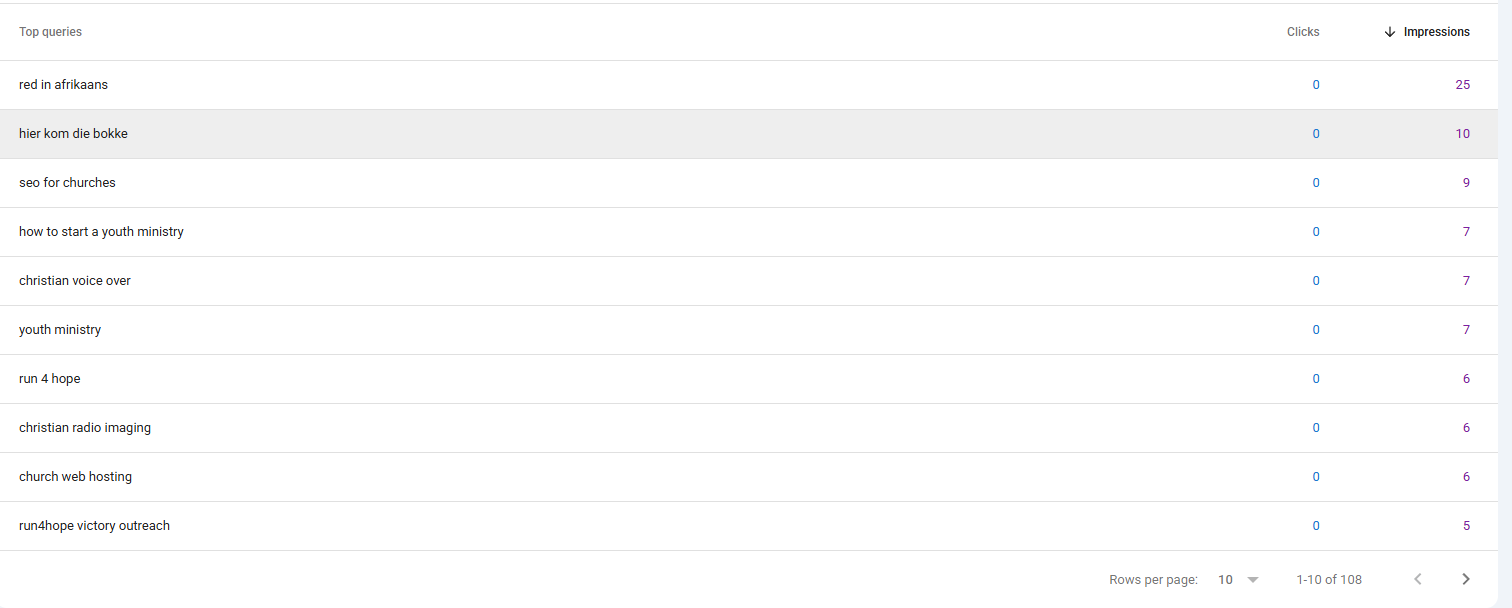
Early Google Search Console data identified more than 100 search queries connected to Pastor Dre YouTube videos and Shorts.
What You Will Learn
- Why linking YouTube to Google Search Console matters
- What YouTube data Search Console can provide
- How to find the searches displaying your videos
- How to identify videos receiving impressions
- How to discover new video ideas
- How to improve titles and thumbnails
- How to find evergreen video topics
- How to build blogs and content clusters
- How Search Console compares with YouTube Studio
- How to optimize your channel with the data
Why Is It Important to Link YouTube With Google Search Console?
YouTube videos can be discovered in more than one environment.
A viewer may find a video through YouTube Search, the Shorts feed, suggested videos, browse features, a playlist, or a direct link.
That same video may also appear when someone searches Google.
YouTube Studio gives creators detailed information about what happens inside YouTube. Google Search Console helps reveal how eligible video content performs through Google.
Two Different Discovery Systems
YouTube Studio helps you understand YouTube viewers. Google Search Console helps you understand Google search visibility.
Using both tools together gives you a more complete picture of how people discover and interact with your content.
Linking the account does not automatically increase rankings.
The value comes from receiving information that can help you make smarter decisions about topics, titles, thumbnails, descriptions, updates, and future content.
To complete the setup, follow: How to Add Your YouTube Channel to Google Search Console .
What Is the Role of YouTube in Google Search Console?
Once a YouTube channel is added and verified as a platform property, Search Console can begin reporting eligible Google performance connected to that channel’s public content.
You may also receive reporting around recent trends, top-performing content, countries, devices, and how people discover your content through Google.
What Is an Impression?
An impression generally means Google displayed your content in an eligible search experience.
A click is recorded when a person selects a qualifying link from Google and visits the connected video or channel content.
Early impressions can be useful even before clicks begin appearing because they show which subjects Google may already associate with your channel.
1 Discover the Google Searches Finding Your Videos
One of the most important YouTube Google Search Console benefits is seeing the search terms connected to your videos.
These are different from general keyword suggestions because Google has already displayed your content for these searches.
Early queries from the Pastor Dre channel included:
- SEO for churches
- How to start a youth ministry
- Youth ministry
- Church web hosting
- Christian radio imaging
- Run 4 Hope
- Red in Afrikaans
These searches can reveal what Google currently understands about your channel.
They may also uncover content opportunities that were not obvious inside YouTube Studio.
Practical Action
Record the queries that closely match your channel’s purpose and expertise. Those keywords may become future videos, playlists, Shorts, blog posts, FAQs, or downloadable resources.
Learn how to evaluate these opportunities in: How to Do Keyword Research for Churches .
2 See Which Videos Google Is Displaying
Search Console can help you identify the individual videos and Shorts receiving impressions through Google.
My early report showed more than 60 pieces of YouTube content receiving at least some Google visibility.
This is valuable because older videos may still have search potential even when they are not currently receiving attention through YouTube recommendations.
A video receiving impressions may be a candidate for:
- A clearer title
- A stronger thumbnail
- An updated description
- A related blog post
- A newer follow-up video
- A playlist or complete video series
Your Older Videos May Still Have Value
Search Console can help you find videos Google is still testing. That gives you a more strategic way to choose which older content deserves attention.
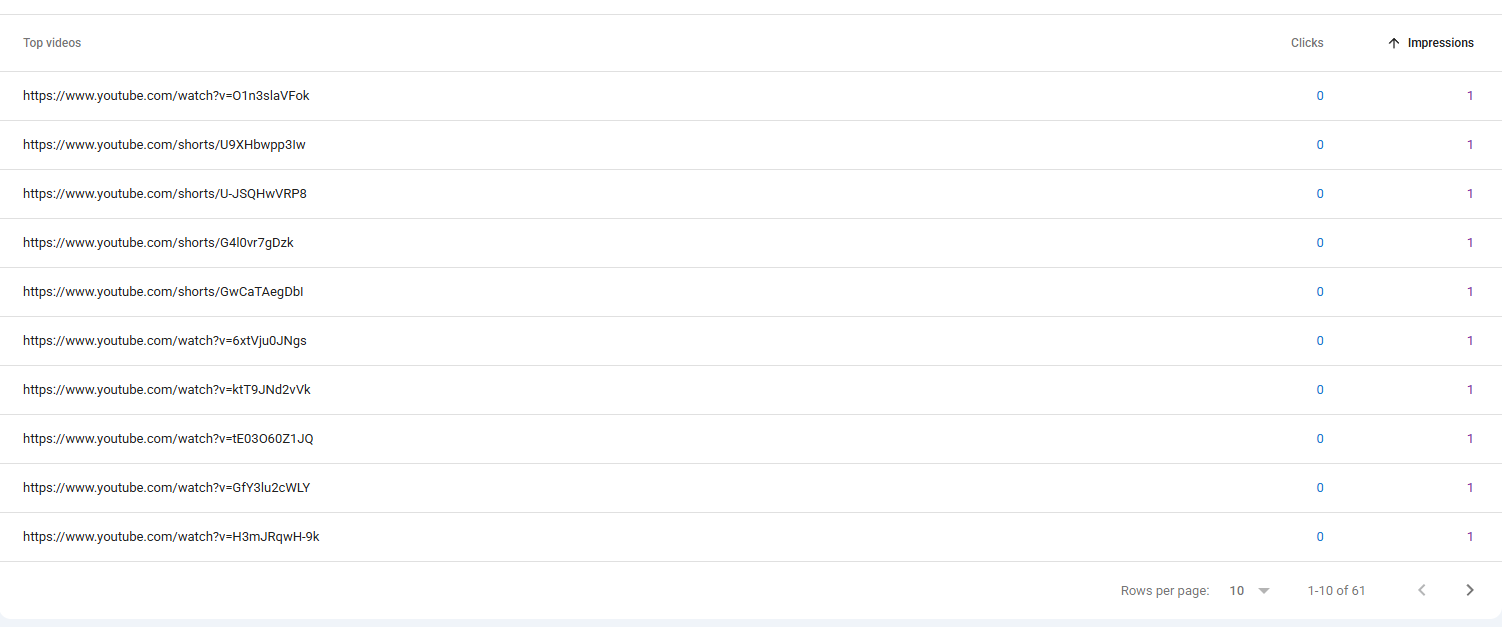
Early Search Console reporting identified more than 60 Pastor Dre videos and Shorts receiving impressions through Google.
3 Discover New Video Ideas From Real Search Demand
One search query can become the beginning of an entire video series.
Suppose Search Console shows your content appearing for:
How to start a youth ministry
That search could lead to videos such as:
- How to create a youth ministry vision
- How to build a youth leadership team
- How to plan your first youth service
- How to attract young people to church
- How to train youth ministry volunteers
- Common youth ministry mistakes
Each video should answer a different part of the larger problem.
Build Around the Viewer’s Journey
Consider what the viewer needs before, during, and after the question they searched. This can help you create a connected series rather than unrelated videos.
4 Find Opportunities to Improve Titles and Thumbnails
Impressions tell you that Google displayed your content. Clicks tell you that someone chose it.
After enough data accumulates, videos with strong impressions but few clicks may deserve closer attention.
Review the following:
- Does the title clearly explain the video’s benefit?
- Does the thumbnail stand out?
- Does the title match the searcher’s language?
- Does the video appear to answer the question?
- Is the topic too broad?
- Do competing videos make a clearer promise?
Give the report time to gather a meaningful sample and look for patterns instead of reacting to isolated activity.
A similar principle applies to website content. Read: Why Your Blog Gets Impressions but No Clicks .
5 Identify Videos With Evergreen Search Value
Some videos receive attention because a topic is trending. Other videos answer questions people continue searching throughout the year.
Evergreen topics may continue generating Google impressions long after the original upload date.
Examples include:
- How to pray
- How to start a youth ministry
- How to build a church website
- How to use Google Search Console
- How to create a church welcome page
- How to improve church SEO
When an older video continues appearing in Google, consider whether you should:
- Update the description.
- Create a newer version.
- Add the video to a playlist.
- Write a supporting article.
- Create Shorts answering related questions.
- Guide viewers toward a helpful next step.
Evergreen Does Not Mean Never Update
The question may remain relevant while screenshots, software interfaces, examples, and recommendations become outdated. Review high-potential videos periodically.
6 Turn Successful Videos Into Blogs and Content Clusters
One useful search topic can become much more than one video.
We used this strategy with YouTube and Google Search Console.
The original topic became:
- A step-by-step YouTube tutorial
- A complete setup blog
- A guide to Search Console for social media
- A follow-up video about the benefits
- This supporting benefits article
- Potential Shorts and LinkedIn posts
The tutorial video then appeared inside Google’s AI Overview and among the prominent video results. The matching PastorDre.com article also appeared high in the regular results.
Blog and Video Working Together
The video provides the visual demonstration. The article provides detailed written guidance, internal links, explanations, and a place for readers to continue learning.
Read the related guide: How to Use Google Search Console for Social Media .
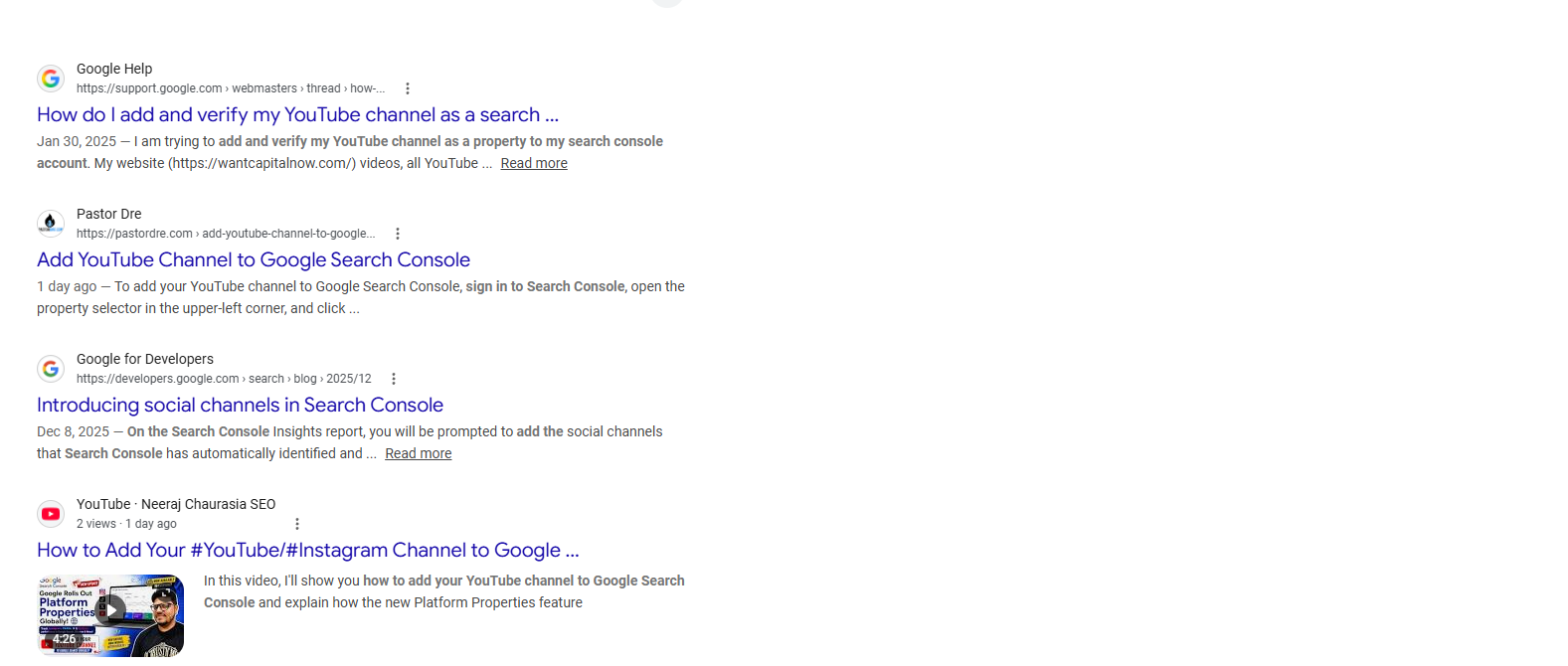
The Pastor Dre YouTube tutorial appeared inside Google’s AI Overview shortly after publication.
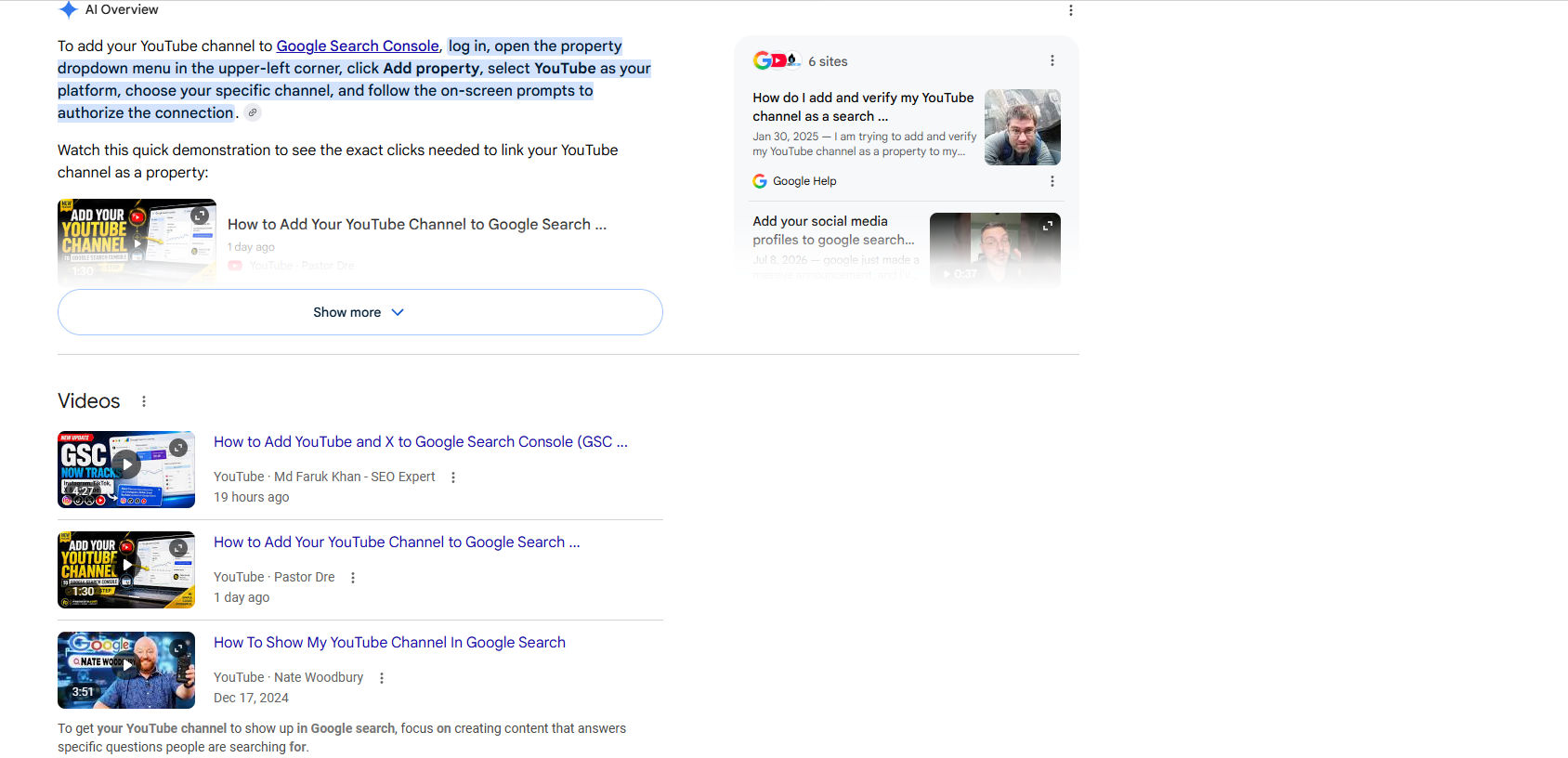
The supporting PastorDre.com article appeared near Google Help while the tutorial ranked among the prominent video results.
7 Compare Google Search Data With YouTube Studio
Google Search Console and YouTube Studio answer different questions.
| YouTube Studio | Google Search Console |
|---|---|
| Measures activity inside YouTube | Measures eligible discovery through Google |
| Shows views and watch time | Shows Google impressions and clicks |
| Shows audience retention | Shows queries and average position |
| Reports suggested, browse, and YouTube Search traffic | Reports Google Search discovery |
| Helps improve viewer engagement | Helps improve Google visibility |
A video may perform well through YouTube recommendations but receive little Google visibility.
Another video may receive moderate activity inside YouTube while continuing to earn Google impressions because it answers an evergreen search question.
YouTube impressions and Google Search impressions are measured in different environments and should be analyzed separately.
How Do I Optimize My YouTube Channel With Google Search Console Data?
Search Console does not optimize the channel automatically. It gives you information that can guide your decisions.
Use this simple process:
The Search Console Optimization Process
- Find a query receiving meaningful impressions.
- Identify the video connected to that search.
- Review the title, thumbnail, description, and search intent.
- Study whether competing results answer the question more clearly.
- Decide whether to improve the existing video or create a stronger follow-up.
- Connect the video to a related blog, playlist, or resource.
- Review the results again after enough time has passed.
Optimization should focus on clarity and usefulness rather than simply repeating keywords.
Use the language people search, but make sure the video genuinely fulfills the promise made in the title.
A Real Example From the Pastor Dre YouTube Channel
Google indicated that initial information might take time to appear after connecting the YouTube platform property.
However, data began appearing sooner than expected.
The early data connected the channel with several areas of Pastor Dre’s experience:
- Church SEO and websites
- Youth ministry
- Afrikaans education
- Christian voice-over and radio imaging
- Run 4 Hope and ministry content
This provides an early map of what Google may already understand about the channel.
The Important Lesson
The real benefit is not simply seeing a list of keywords. The benefit is using those searches to guide content decisions, website resources, ministry goals, and the audience you want to serve.
How Often Should You Review YouTube Search Console Data?
Most creators do not need to check the report every day.
A focused monthly review can provide enough information to guide useful decisions.
The 30-Minute YouTube Search Review
- Open the YouTube platform property.
- Set the report to the previous 28 days.
- Record total impressions and clicks.
- Review the top search queries.
- Review the videos receiving the most impressions.
- Find content beginning to receive clicks.
- Identify unexpected keyword opportunities.
- Select one existing video to improve.
- Select one new video topic.
- Record the next actions in a content tracker.
| Finding | Possible Meaning | Next Action |
|---|---|---|
| High impressions and few clicks | The topic has visibility, but the result may not attract attention | Review title, thumbnail, and search intent |
| Unexpected keyword | Google associates the channel with an unplanned subject | Decide whether it fits your strategy |
| Older video gaining impressions | The topic may have evergreen value | Update it or create a follow-up |
| Several related queries | The topic may support a series or cluster | Plan related videos and a supporting blog |
Common Mistakes to Avoid
Mistake 1: Expecting the Connection to Improve Rankings
Connecting YouTube provides reporting. It does not guarantee rankings, impressions, or clicks.
Mistake 2: Changing Videos Based on Very Little Data
One or two impressions are not enough to justify changing a title, thumbnail, or entire content strategy.
Mistake 3: Treating Every Query as a Separate Topic
Similar keywords may share the same search intent. Group related searches before planning content.
Mistake 4: Confusing Search Console With YouTube Studio
The platforms measure different environments. Use both reports without treating their numbers as interchangeable.
Mistake 5: Creating Content That Does Not Fit the Channel
An unexpected keyword may be interesting, but it should still align with the audience and purpose of the channel.
Mistake 6: Collecting Data Without Taking Action
The report becomes valuable when it helps you improve one video, answer one question, or create one useful new resource.
Frequently Asked Questions
What are the benefits of linking YouTube to Google Search Console?
The benefits include discovering Google queries, identifying videos receiving impressions, finding content ideas, improving titles and thumbnails, uncovering evergreen topics, building content clusters, and comparing Google discovery with YouTube Studio.
Why is YouTube integration with Google Search Console important?
It provides information about how eligible YouTube content performs through Google, giving creators a different perspective from YouTube Studio.
Can Google Search Console improve my YouTube ranking?
Search Console does not directly improve rankings. It provides data that can help you make stronger content and optimization decisions.
Should I use Google Search Console for my YouTube strategy?
Yes, especially when Google Search visibility is important to your content. Use it alongside YouTube Studio rather than as a replacement.
When should I connect my YouTube account?
Connect it as soon as the platform-property option is available and you have access to the correct YouTube account.
Can Search Console show keywords for YouTube videos?
It can show Google queries associated with eligible content from the connected property. Some searches may be omitted for privacy.
Does Search Console replace YouTube Studio?
No. YouTube Studio measures activity inside YouTube, while Search Console measures eligible discovery through Google.
Turn YouTube Search Data Into a Smarter Content Strategy
The YouTube Google Search Console benefits go beyond receiving another set of analytics.
The information can help you understand what people search, identify videos Google already displays, find older content with potential, and create new videos around real audience interest.
It can also help you connect YouTube with your website, blog, social media, and broader digital outreach strategy.
Start by allowing the information to accumulate.
Then choose one query to study, one existing video to improve, and one new resource to create.
Small, consistent decisions can build a powerful library of helpful content that continues reaching people long after publication.
Ready to Connect Your YouTube Channel?
Follow the complete step-by-step tutorial to add and verify your YouTube channel as a Google Search Console platform property.
Follow the YouTube Setup Guide Request a Free Digital Visibility Review