
A church website is no longer just a nice thing to have.
For many people, your website is the first place they go before they ever walk through your church doors.
Before someone visits your Sunday service, they may search for your church on Google. They may look for your service times. They may check your location. They may want to know what to expect, what ministries you offer, whether their kids will be safe, and whether your church feels like a place they can belong.
That means when you build a church website, you are not just creating a digital brochure.
You are building a digital front door.
A strong church website helps people find your church, understand your ministry, and take the next step. It should serve visitors, members, families, volunteers, and people in your community who are searching for hope, answers, and connection.
In this guide, we will walk through how to build a church website that is clear, mobile-friendly, visitor-focused, and built to help your church get found online.
Why Your Church Website Matters
Your church website matters because people often visit your website before they visit your building.
Someone may see your church sign while driving. Someone may hear about your church from a friend. Someone may search “church near me” or “church for families” on Google. Before they decide to attend, they will often check your website first.
When they arrive on your site, they are asking a few silent questions:
Can I find the service times?
Where is this church located?
What should I expect when I visit?
Is there something for my kids?
What kind of church is this?
Do I feel comfortable taking the next step?
If your website answers those questions clearly, it can help remove fear, confusion, and hesitation.
If your website is outdated, confusing, slow, or hard to use on a phone, people may leave before they ever visit.
That is why building a church website is not just about design. It is about ministry.
What Is the Purpose of a Church Website?
The purpose of a church website is to help people take the next step with your church.
For a first-time visitor, that next step may be planning a visit.
For a church member, that next step may be finding a ministry, signing up for an event, watching a sermon, or giving online.
For someone searching spiritually, that next step may be learning more about your church, hearing the Gospel, or reaching out for prayer.
A strong church website should help people do three things:
Find information quickly.
Understand who your church is.
Take action without confusion.
When you build your church website around those goals, your site becomes more than a page online. It becomes a ministry tool.
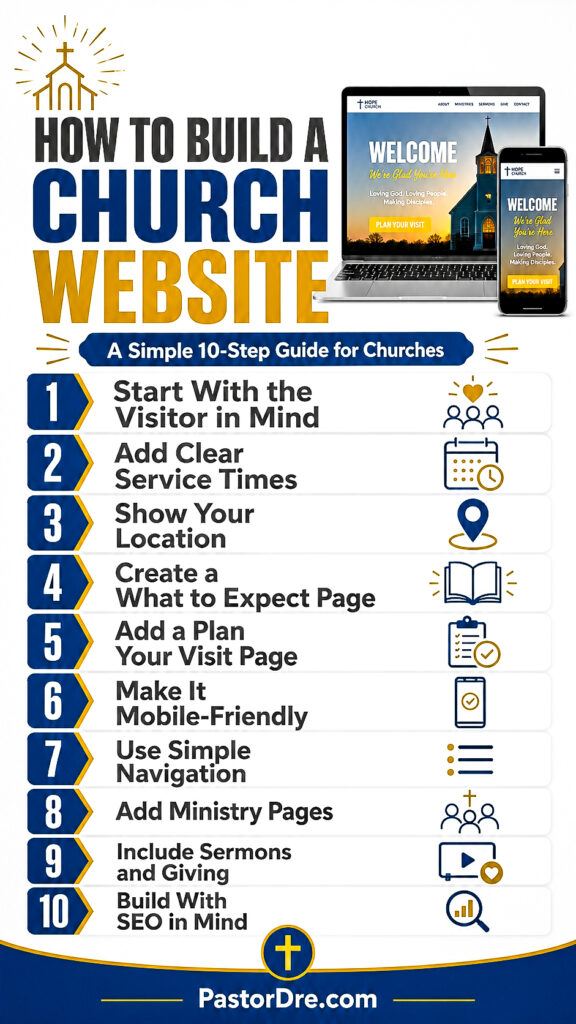
Step 1: Start With the Visitor in Mind
Before you choose a platform, theme, template, or design style, start with the visitor.
Many churches build their website from the inside out. They think first about their ministries, departments, announcements, and internal needs.
Those things matter, but the first-time visitor should be one of the main people you build the website for.
Ask yourself:
What does a first-time visitor need to know?
What questions would they have before attending?
What would make them feel comfortable?
What might keep them from visiting?
What next step do we want them to take?
When your website is built with the visitor in mind, your content becomes clearer. Your navigation becomes simpler. Your homepage becomes more useful. Your calls to action become stronger.
A visitor-focused church website is not about impressing people.
It is about helping people.
Step 2: Make Service Times Easy to Find
One of the most important things on your church website is your service times.
This may sound simple, but many church websites make people search too hard to find when services happen.
Your service times should be easy to find on your homepage, in your header or near the top of the page, on your Plan Your Visit page, and on your contact or location page.
Do not hide your service times deep inside a paragraph.
Make them clear.
For example:
Sunday Worship Service: 10:00 AM
Wednesday Bible Study: 7:00 PM
Prayer Service: Fridays at 7:00 PM
If your service times change for holidays or special events, make sure your website is updated.
Outdated service times can create frustration and cause people to lose trust.
Step 3: Add Your Location Clearly
Your church address should be easy to find.
This is especially important for people searching on mobile devices. Someone may be in the car, looking up your church, trying to get directions.
Include your full address on your homepage, contact page, footer, and Plan Your Visit page.
You can also embed a Google Map to make directions easier.
Your location section should include:
Church name
Full street address
City, state, and ZIP code
Parking information if needed
Entrance instructions if helpful
A Google Maps link or embedded map
If your church meets inside another building, school, rented space, theater, or community center, make that clear. Do not assume people will know where to go.
The more clarity you give, the easier it is for someone to visit.
Step 4: Create a What to Expect Page
A What to Expect page is one of the most helpful pages a church website can have.
People who are new to church may feel nervous. They may not know what to wear, where to park, how long the service lasts, what the music is like, or what happens with their children.
Your What to Expect page can answer those questions before they arrive.
Include information such as:
What time service starts
How long service usually lasts
What the worship style is like
What people usually wear
Where visitors should go when they arrive
Whether children’s ministry is available
What happens after service
How someone can connect with your church
This page does not need to be complicated. It just needs to be clear and welcoming.
The goal is to help people feel less nervous about visiting.
Step 5: Add a Plan Your Visit Page
A Plan Your Visit page is different from a general contact page.
A contact page gives information.
A Plan Your Visit page invites action.
This page should help someone take a clear next step before attending church.
It can include:
Service times
Location
Parking information
Children’s ministry details
A short welcome message
A simple form
A button that says “Plan Your Visit”
The form can ask for basic information like name, email, phone number, how many people are coming, and whether they have children.
You do not need to overcomplicate it. The goal is to make visiting feel easier and more personal.
A Plan Your Visit page can be especially helpful for churches that want to connect with new guests before Sunday.
Step 6: Make the Website Mobile-Friendly
This one right here is really important.
A mobile-friendly church website is no longer optional.
Many people will visit your church website from their phone. If your site is hard to read, slow to load, or difficult to navigate on mobile, people may leave quickly.
When building your church website, check how it looks on a phone.
Ask these questions:
Can visitors read the text easily?
Are buttons easy to tap?
Can people find service times quickly?
Does the menu work well?
Do images load properly?
Is the site fast enough?
Is the Plan Your Visit button easy to find?
A church website can look great on a desktop and still be frustrating on a phone.
Always test the mobile version.
Step 7: Use Simple Navigation
Your website navigation should be simple and easy to understand.
Do not make people guess where to click.
A good church website menu may include:
Home
New Here
About
Ministries
Sermons
Events
Give
Contact
Plan Your Visit
You do not need to include every ministry or announcement in the main menu. Too many options can overwhelm people.
Keep the most important pages easy to find.
The goal of navigation is not to show everything.
The goal is to guide people.
Step 8: Use Real Photos of Your Church
Real photos help people connect with your church before they visit.
Stock photos can look clean, but they often feel generic. When possible, use real photos of your building, worship service, leaders, families, volunteers, and community events.
Real photos help visitors see what your church is actually like.
Use photos that show:
Friendly people
Worship moments
Community
Families
Smiling volunteers
Your church building or meeting space
Your pastor or leadership team
Children’s ministry areas if appropriate
Make sure photos are clear, bright, and welcoming.
You do not need a professional photo shoot to start. Even a few strong real photos can make your website feel more personal and trustworthy.
Step 9: Add Ministry Pages
Your church website should help people understand what your church offers.
Ministry pages are helpful because people may be looking for specific areas of connection.
For example:
Children’s Ministry
Youth Ministry
Young Adults
Men’s Ministry
Women’s Ministry
Small Groups
Prayer Ministry
Outreach
Recovery Ministry
Worship Ministry
Each ministry page should explain who the ministry is for, when it meets, what someone can expect, and how to get involved.
Do not just list ministry names.
Give people enough information to take the next step.
Step 10: Add Sermons or Media
A sermon page can help people experience your church before visiting.
Someone may want to hear your pastor preach before attending. Someone may want to see what your worship service is like. Someone may want to share a message with a friend.
Your sermon or media page can include:
Recent sermons
YouTube embeds
Podcast episodes
Message series
Bible teaching
Short clips
Live stream links
You do not need to make this complicated. Start with your most recent sermons and keep the page updated.
A strong sermon page can serve both members and new visitors.
Step 11: Include Online Giving
Online giving is an important part of many church websites.
Your giving page should be clear, secure, and easy to use.
It should explain why giving matters, how giving supports the ministry, and how people can give.
Avoid making the giving page feel cold or transactional.
Connect giving to mission.
For example:
Your giving helps support outreach, discipleship, missions, community impact, ministry to families, and the work of the Gospel through our church.
Make sure the giving button is easy to find, but do not let it overpower the visitor-focused parts of your website.
Step 12: Build the Website With SEO in Mind
If you want people to find your church online, your website needs to be built with SEO in mind.
SEO stands for search engine optimization. It helps your website show up when people search on Google.
Church website SEO helps your church show up when people search for ministries, service times, and churches in your area.
For churches, SEO can help with searches like:
church near me
church in your city
family church near me
youth ministry near me
church services in your city
Bible teaching church
church events near me
When you build a church website, think about the words people are actually searching for.
Your website should include your church name, city, service times, location, ministry pages, and helpful content that answers questions people are asking.
A beautiful church website that no one can find is limited.
A clear, helpful, SEO-friendly church website can help more people discover your ministry.
If you want to understand why your church website needs more than good design, watch this short lesson on why SEO matters for churches.
Step 13: Connect Google Search Console and Google Analytics
After you build your church website, you should connect it to Google Search Console and Google Analytics.
Google Search Console helps you understand how your website is performing in Google Search.
It can show you:
What keywords people used to find your website
Which pages are getting impressions
Which pages are getting clicks
What pages Google is testing
Indexing issues
Search performance over time
Google Analytics helps you understand how people use your website.
It can show you:
How many people visit your site
Where visitors come from
Which pages they view
How long they stay
What devices they use
What actions they take
These tools help you stop guessing.
They show you what is actually happening.
Step 14: Choose the Right Website Platform
One of the common questions churches ask is, “What platform should we use to build our church website?”
There are several options.
Some churches use WordPress. Some use Squarespace, Wix, Webflow, Sharefaith, Tithe.ly, Subsplash, or other church website platforms.
The right platform depends on your church’s needs, budget, team, and long-term goals.
When choosing a platform, ask:
Is it easy to update?
Does it work well on mobile?
Can we add SEO titles and descriptions?
Can we create blog posts?
Can we add sermon pages?
Can we embed videos?
Can we connect forms?
Can we connect Google Search Console?
Can we grow with this platform?
Can our team manage it?
Do not only choose the cheapest option.
Choose the platform that helps your church communicate clearly and grow online.
Step 15: Can You Build a Church Website for Free?
Yes, you can build a church website for free or very low cost, but there are tradeoffs.
Free tools can be helpful for churches that are just starting out or have no budget. However, free websites may have limitations with design, branding, SEO, features, domain names, storage, support, and long-term flexibility.
A free website is better than having no website, but it may not be the best long-term solution.
If your church starts with a free or low-cost option, make sure you still focus on the essentials:
Clear service times
Location
Mobile-friendly design
Plan Your Visit page
What to Expect page
Contact information
Basic SEO
The platform matters, but clarity matters more.
A simple website that is clear is better than a fancy website that confuses people.
Step 16: How Much Does It Cost to Build a Church Website?
The cost of building a church website can vary.
A basic do-it-yourself website may cost very little each month. A more advanced custom church website can cost hundreds or thousands of dollars depending on the design, features, content, SEO setup, integrations, and ongoing support.
When comparing cost, do not only ask, “How much is the website?”
Ask:
Will it be mobile-friendly?
Will it be easy to update?
Will it include SEO setup?
Will it include visitor-focused pages?
Will it help people take action?
Will it connect with Google tools?
Will it support sermons, giving, events, and ministries?
Will someone train our team?
Will it be maintained after launch?
The cheapest website is not always the best value.
If your church is considering outside help, it is important to understand what church website design services should actually include.
A website that helps people find your church, plan a visit, and connect with your ministry can be a strong investment.
Step 17: Church Website Design Ideas That Work
When thinking through church website design ideas, focus on clarity before creativity.
A strong church website design should feel welcoming, organized, and easy to use.
Here are a few design ideas that work well:
A clear homepage headline
A visible Plan Your Visit button
Service times near the top
Real photos of your church
Simple navigation
Mobile-friendly layout
Ministry sections
Sermon highlights
Upcoming events
A clear footer with address and contact information
Avoid clutter.
Do not overload the homepage with every announcement, every ministry, and every possible button.
Give people a clear path.
Step 18: Top Features for Church Websites
The top features for church websites are not always the flashiest features.
The best features are the ones that help people find information and take action.
Your church website should include:
Clear service times
Easy-to-find location
Mobile-friendly design
Simple navigation
What to Expect page
Plan Your Visit page
Ministry pages
Sermon or media page
Giving page
Contact form
SEO-friendly structure
Fast loading speed
Real photos
Clear next steps
These features work together to make your website more useful.
Step 19: Common Mistakes Churches Make When Building a Website
Many church websites struggle because they are built around design instead of clarity.
Here are common mistakes to avoid:
Hiding service times
Using outdated photos
Making the menu too complicated
Not having a Plan Your Visit page
Not showing the church address clearly
Having a website that is hard to use on mobile
Using too much church language without explanation
Not updating events or announcements
Forgetting SEO
Not connecting Google Search Console
Not giving visitors a clear next step
Most of these are easy to fix.
The key is to look at your website through the eyes of someone who has never visited your church before.
Step 20: How to Create a Modern Church Website
A modern church website is not just about trendy design.
A modern church website is clear, fast, mobile-friendly, and easy to update.
Think about the Google homepage. It is not packed with pictures, banners, buttons, and distractions. It is simple because it has one main goal: help people search and find answers.
Your church website can learn from that. It does not need to be the fanciest website online or have every bell and whistle.
It needs to help people get the answers they came for. If someone wants service times, make them easy to find. If someone wants your location, make the address clear. If someone wants to know what to expect, guide them with confidence.
A modern church website should have one clear goal and do that goal well: help people find answers and take the next step.
It should help people understand who you are and what to do next.
To create a modern church website, focus on:
Clean design
Strong images
Clear headlines
Simple pages
Mobile experience
Easy navigation
Fast loading speed
Visitor-focused content
SEO-friendly structure
Clear calls to action
Your website does not need to look like a tech company.
It needs to represent your church well and serve people clearly.
Step 21: Keep Your Website Updated
A church website is not something you build once and forget.
It needs regular updates.
Check your website often to make sure:
Service times are correct
Events are current
Staff information is updated
Ministry pages are accurate
Sermons are current
Forms are working
Links are not broken
Photos still represent your church well
The homepage is not outdated
A stale website can make people wonder if the church is still active.
An updated website builds trust.
Step 22: Use Your Website as Part of Digital Outreach
Your church website should be part of your larger digital outreach strategy.
Social media is helpful, but your website is where people can go deeper.
A social media post may get someone’s attention.
Your website can help them take the next step.
That is why your church website should connect with your content, videos, sermons, events, blogs, giving, emails, and follow-up systems.
Your website should not sit alone.
It should be part of how your church reaches people online.
FAQ: Build a Church Website
How do I build a church website?
To build a church website, start by identifying who the website is for and what next steps you want people to take. Then create the essential pages, including homepage, service times, location, What to Expect, Plan Your Visit, ministries, sermons, giving, and contact. Make sure the site is mobile-friendly and built with SEO in mind.
What should a church website include?
A church website should include service times, location, contact information, ministry pages, sermon or media content, giving, a What to Expect page, a Plan Your Visit page, and clear next steps for visitors and members.
How do I create a mobile-friendly church website?
To create a mobile-friendly church website, use a responsive design, keep text easy to read, make buttons easy to tap, simplify the menu, compress images, and test every major page on a phone.
Can I build a church website for free?
Yes, you can build a church website for free using certain website builders, but free options may have limitations. A free website can be a good starting point, but your church should still focus on clarity, mobile design, visitor pages, and basic SEO.
What is the average cost of building a church website?
The cost of building a church website depends on the platform, design, features, content, SEO setup, and support. A do-it-yourself site may be low cost, while a custom website with strategy, design, SEO, and integrations can cost more.
What are the best practices for church websites?
Best practices for church websites include clear service times, easy-to-find location, simple navigation, mobile-friendly design, real photos, visitor-focused pages, fast loading speed, SEO-friendly content, and clear calls to action.
How do I choose the right platform for a church website?
Choose a platform that is easy to update, mobile-friendly, SEO-friendly, flexible, and able to support your church’s needs. Consider whether it can handle sermons, events, giving, forms, blog content, and Google tool connections.
When should I update my church website content?
You should update your church website whenever service times, events, ministries, staff, sermons, or important church information changes. It is also wise to review your main pages every month to make sure everything is still accurate.
Final Thoughts: Build a Church Website That Serves People
When you build a church website, do not only think about pages, colors, fonts, and technology.
Think about people.
Think about the family looking for a church.
Think about the young adult searching for community.
Think about the parent wondering if there is a safe place for their children.
Think about the person who has not been to church in years but is finally ready to take a step toward God.
Your website can help make that step easier.
The goal is not just to build a church website that looks good.
The goal is to build a church website that helps people find your church, feel welcome, and take the next step.
A clear church website can support your mission, strengthen your digital outreach, and help more people connect with what God is doing through your church.